Store versioned key/value secrets
Securing secrets is important for all organizations. Vault's K/V secrets engine provides a secure and flexible way to store static secrets such as passwords and API keys.
The Vault KV secrets engine version 2 retains a configurable number of secret versions. This enables older versions' data to be retrievable in case of unwanted deletion or updates of the data. In addition, you can use its Check-and-Set operations to protect the data from being overwritten unintentionally.
The KV secrets engine version 1 does not provide a way to version or roll back secrets. This made it difficult to recover from unintentional data loss or overwrite when more than one user is writing at the same path.
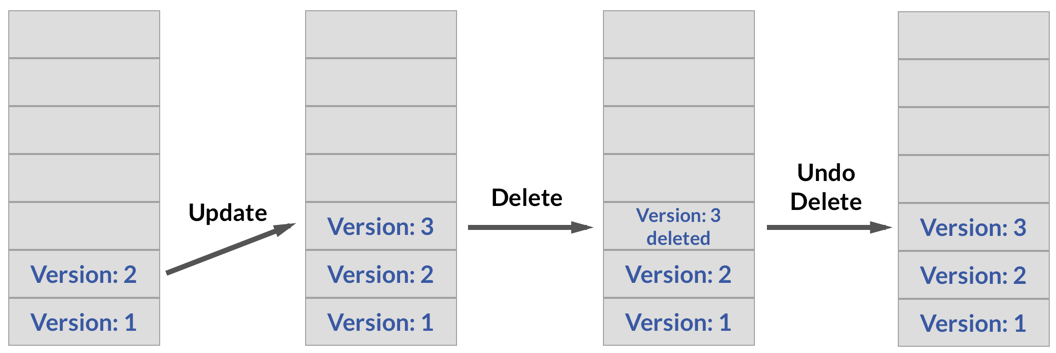
What this tutorial covers
This tutorial will walk you through the basic features of the KV v2 secrets engine:
- Check the KV secrets engine version
- Write secrets
- Retrieve a specific version of secret
- Specify the number of versions to keep
- Delete versions of secret
- Permanently delete data
- Configure automatic data deletion
- Check-and-Set operations
Prerequisites
To perform the tasks described in this tutorial, you need to have a Vault environment. Refer to the Vault install guide to install Vault.
Launch Terminal
This tutorial includes a free interactive command-line lab that lets you follow along on actual cloud infrastructure.

Policy requirements
To perform all tasks demonstrated in this tutorial, your policy must include the following permissions:
# Write and manage secrets in key-value secrets engine
path "secret*" {
  capabilities = [ "create", "read", "update", "delete", "list", "patch" ]
}

# To enable secrets engines
path "sys/mounts/*" {
  capabilities = [ "create", "read", "update", "delete" ]
}
To perform all tasks demonstrated in this tutorial, you are going to need to run
a number of vault CLI commands. Adding the -output-policy flag does not
execute the command, but instead prints the ACL policy needed to execute the command.
Check the policy needed for kv put:
$ vault kv put -output-policy secret/customer/acme customer_name="ACME Inc." \
    contact_email="john.smith@acme.com"
Output:
path "secret/data/customer/acme" {
  capabilities = ["create", "update"]
}
Now, check the ACL policy needed for kv get:
$ vault kv get -output-policy secret/customer/acme
path "secret/data/customer/acme" {
  capabilities = ["read"]
}
If you are not familiar with policies, complete the policies tutorial.
Lab setup
Launch the HCP Portal and login.
Click Vault in the left navigation pane.
In the Vault clusters pane, click vault-cluster.
Under Cluster URLs, click Public Cluster URL.
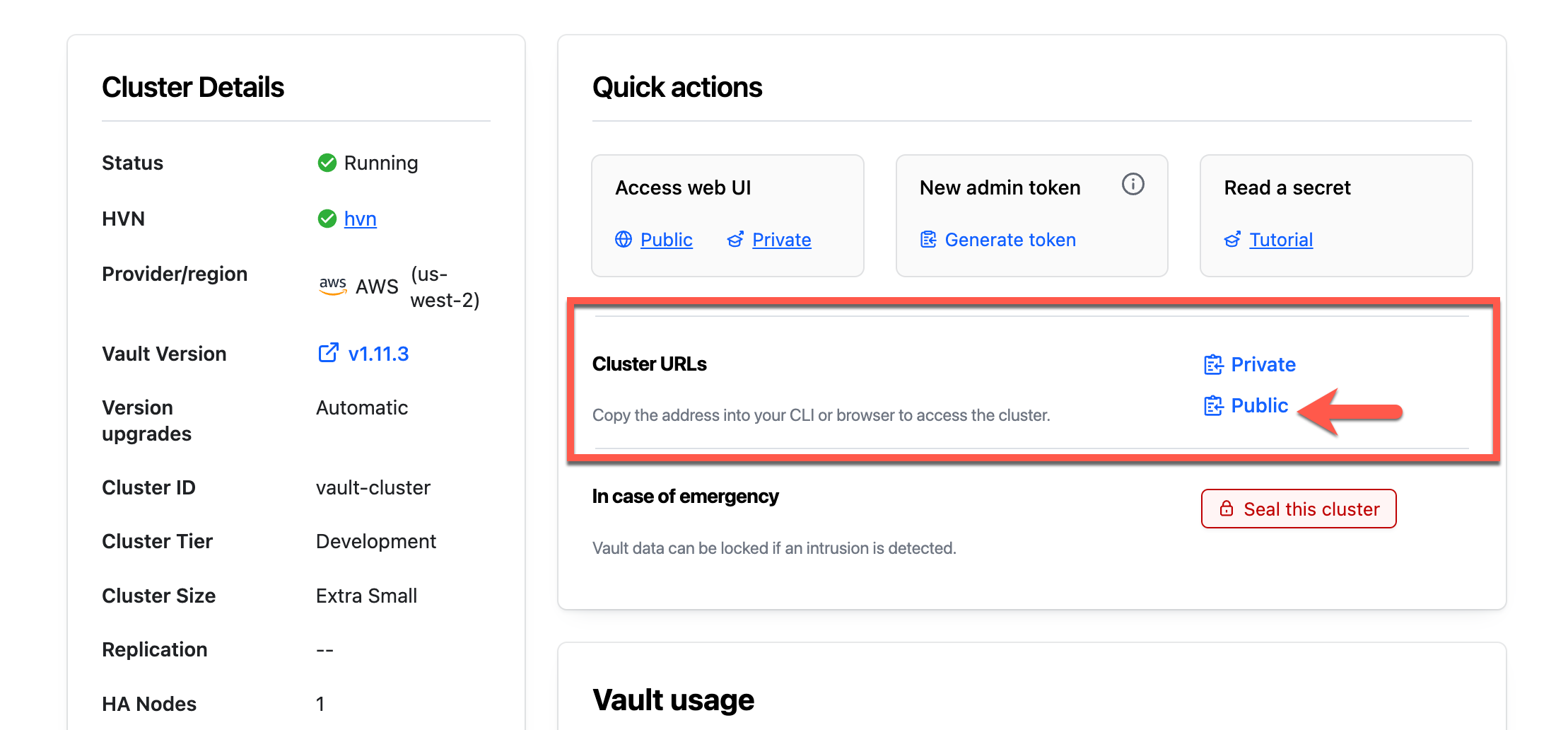
In a terminal, set the
VAULT_ADDRenvironment variable to the copied address.$ export VAULT_ADDR=<Public_Cluster_URL>Return to the Overview page and click Generate token.
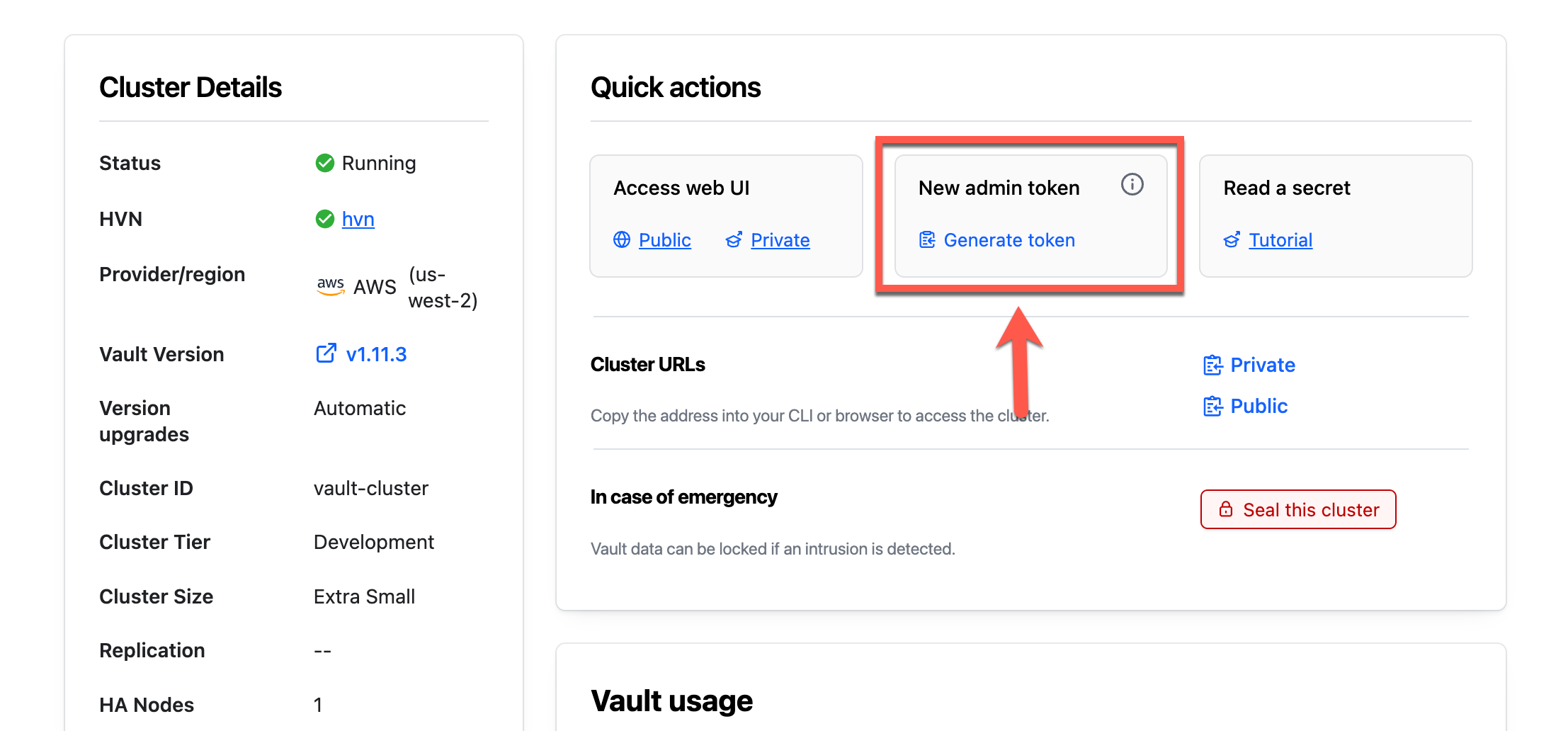
Within a few moments, Vault generates a new token.
Copy the Admin Token.
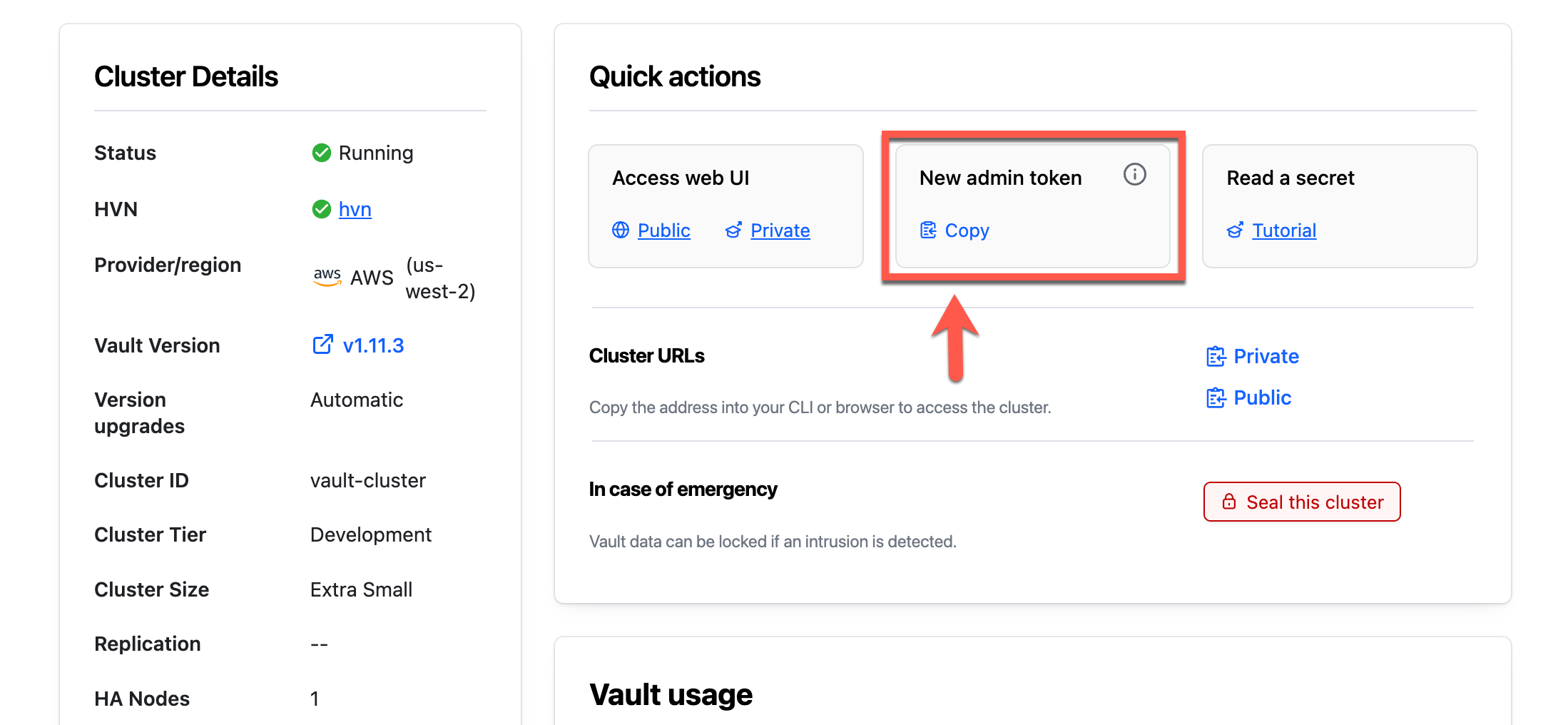
Return to the terminal and set the
VAULT_TOKENenvironment variable.$ export VAULT_TOKEN=<token>Set the
VAULT_NAMESPACEenvironment variable toadmin.$ export VAULT_NAMESPACE=adminThe
adminnamespace is the top-level namespace automatically created by HCP Vault. All CLI operations default to use the namespace defined in this environment variable.Type
vault statusto verify your connectivity to the Vault cluster.$ vault status Key Value --- ----- Recovery Seal Type shamir Initialized true Sealed false Total Recovery Shares 1 Threshold 1 Version 1.9.2+ent Storage Type raft ...snipped...
The Vault Dedicated server is ready.
Check the KV secrets engine version
(Persona: admin)
The Vault server started in dev
mode, automatically enables v2
of the KV secrets engine at the secret/ path. Verify you enabled the KV secrets engine version 2.
Display all the enabled secrets engine.
$ vault secrets list -detailed

Path          Type         Accessor           ...   Options           Description
----          ----         --------                 -------           -----------
cubbyhole/    cubbyhole    cubbyhole_9d52aeac ...   map[]             per-token private secret storage
identity/     identity     identity_acea5ba9  ...   map[]             identity store
secret/       kv           kv_2226b7d3        ...   map[version:2]    key/value secret storage
...
The results display a table of all enabled secrets engines. One entry in the table has the Path of
secret/with the Type ofkv. The Options column displays the version number.Display the details of
kvsecrets engine enabled atsys/mounts/<name>.$ vault read sys/mounts/secretExample output:
Key Value --- ----- accessor kv_a99903ee config map[default_lease_ttl:0 force_no_cache:false max_lease_ttl:0] deprecation_status supported description key/value secret storage external_entropy_access false local false options map[version:2] plugin_version n/a running_plugin_version v0.20.0+builtin running_sha256 n/a seal_wrap false type kv uuid d8a40382-902e-57c3-16bb-df49300a3e0fEnable KV v2 at
secret/.$ vault secrets enable -path=secret kv-v2If the KV version is
version:1, upgrade it toversion:2.$ vault kv enable-versioning secret/

Write secrets
To better understand how the versioning works, write some test data.
Create a secret at the path
secret/customer/acmewith acustomer_nameandcontact_email.$ vault kv put secret/customer/acme customer_name="ACME Inc." \ contact_email="john.smith@acme.com"The following command is equivalent to the above command, but specifies the
-mountparameter specifies which secrets engine to use.$ vault kv put -mount=secret customer/acme customer_name="ACME Inc." \ contact_email="john.smith@acme.com"Example output:
====== Secret Path ======
secret/data/customer/acme

======= Metadata =======
Key                Value
---                -----
created_time       2022-06-13T13:41:45.673767Z
custom_metadata    <nil>
deletion_time      n/a
destroyed          false
version            1
The secret stores metadata along with the secret data. The
versionis an auto-incrementing number that starts at1.Create secret at the same path
secret/customer/acmebut with different secret data.$ vault kv put secret/customer/acme customer_name="ACME Inc." \ contact_email="john.smith@acme.com"Example output:
====== Secret Path ======
secret/data/customer/acme

======= Metadata =======
Key                Value
---                -----
created_time       2022-06-13T13:41:45.673767Z
custom_metadata    <nil>
deletion_time      n/a
destroyed          false
version            2
The secret is fully replaced and the version incremented to
2.Get the secret defined at the path
secret/customer/acme.$ vault kv get secret/customer/acmeThe following command is equivalent to the above command, but specifies the
-mountparameter specifies which secrets engine to use.$ vault kv get -mount=secret customer/acmeExample output:
====== Secret Path ======
secret/data/customer/acme

======= Metadata =======
Key                Value
---                -----
created_time       2022-06-13T12:59:47.15049Z
custom_metadata    <nil>
deletion_time      n/a
destroyed          false
version            2

======== Data ========
Key              Value
---              -----
contact_email    jsmith@acme.com
name             ACME Inc.
The output displays version 2 of the secret. Creating a secret at the same path replaces the existing data; fields are not merged together. The secret data stored in earlier versions is still accessible but it is no longer returned by default.
Patch the existing data
While vault kv put fully replaces the current version of the secret;
therefore, you need to send the entire set of data including the values that
remain the same. To partially update the current version of the secret, you can
use vault kv patch command instead.
Use case: Think of an application that does not have read permission, but
captures partial data updates. The vault kv patch command allows the
application to send the changing values to Vault.
Update the
contact_emailvalue toadmin@acme.com(current value isjohn.smith@acme.com).$ vault kv patch secret/customer/acme contact_email="admin@acme.com"Example output:
====== Secret Path ======
secret/data/customer/acme

======= Metadata =======
Key                Value
---                -----
created_time       2022-06-13T13:40:17.992243Z
custom_metadata    <nil>
deletion_time      n/a
destroyed          false
version            6
The patch command creates a new version of the secret which merges the fields within the secret data.
Read the secret at
secret/customer/acmeto verify the change.$ vault kv get secret/customer/acme ====== Secret Path ====== secret/data/customer/acme ======= Metadata ======= Key Value --- ----- created_time 2022-06-13T13:41:45.673767Z custom_metadata <nil> deletion_time n/a destroyed false version 3 ======== Data ======== Key Value --- ----- contact_email john.smith@acme.com customer_name ACME Inc.The
contact_emailvalue is nowadmin@acme.com, and theversionis now 3.
Add custom metadata
You saw that the secret's key (in this example, secret/customer/acme) has
metadata associated with it. An organization may want to add custom metadata
describing further details (technical contact, mission criticality, etc.) about
the secret.
You can add custom metadata using
custom_metadataparameter. This feature stores a map of arbitrary string-to-string valued user-provided metadata meant to describe the secret.$ vault kv metadata put -custom-metadata=Membership="Platinum" secret/customer/acme Success! Data written to: secret/metadata/customer/acmeYou can repeat the
-custom-metadataflag to add multiple key-value pairs.$ vault kv metadata put -custom-metadata=Membership="Platinum" \ -custom-metadata=Region="US West" secret/customer/acmeOutput:
Success! Data written to: secret/metadata/customer/acmeWhen you read the secret, the returned secret metadata displays the custom metadata.
$ vault kv get secret/customer/acmeExample output:
====== Secret Path ======
secret/data/customer/acme

======= Metadata =======
Key                Value
---                -----
created_time       2022-06-13T13:41:45.673767Z
custom_metadata    map[Membership:Platinum Region:US West]
deletion_time      n/a
destroyed          false
version            3

======== Data ========
Key              Value
---              -----
contact_email    john.smith@acme.com
customer_name    ACME Inc.


Retrieve a specific version of secret
You may run into a situation where you need to view the secret before an update.
Get version 1 of the secret defined at the path
secret/customer/acme.$ vault kv get -version=1 secret/customer/acme ====== Secret Path ====== secret/data/customer/acme ======= Metadata ======= Key Value --- ----- created_time 2022-06-13T15:09:01.710331Z custom_metadata map[Membership:Platinum Region:US West] deletion_time n/a destroyed false version 1 ======== Data ======== Key Value --- ----- contact_email admin@acme.com customer_name ACME Inc.Get the
metadataof the secret defined at the pathsecret/customer/acme.$ vault kv metadata get secret/customer/acme ======= Metadata Path ======= secret/metadata/customer/acme ========== Metadata ========== Key Value --- ----- cas_required false created_time 2021-10-31T00:08:46.869191Z current_version 3 custom_metadata map[Membership:Platinum Region:US West] delete_version_after 0s max_versions 0 oldest_version 0 updated_time 2021-10-31T00:10:14.147236Z ====== Version 1 ====== Key Value --- ----- created_time 2021-10-31T00:08:46.869191Z deletion_time n/a destroyed false ====== Version 2 ====== Key Value --- ----- created_time 2021-10-31T00:09:32.659503Z deletion_time n/a destroyed false ====== Version 3 ====== Key Value --- ----- created_time 2021-10-31T00:10:14.147236Z deletion_time n/a destroyed false


Specify the number of versions to keep
By default, the kv-v2 secrets engine keeps up to 10 versions. For this tutorial, limit the
maximum number of versions to keep to be 4.
Configure the secrets engine at path
secret/to limit all secrets to a maximum of4versions.$ vault write secret/config max_versions=4 Success! Data written to: secret/configEvery secret stored for this engine can retain up to
4versions.Display the secrets engine configuration settings.
$ vault read secret/config

Key                     Value
---                     -----
cas_required            false
delete_version_after    0s
max_versions            4
Configure the secret at path
secret/customer/acmeto limit secrets to a maximum of4versions.$ vault kv metadata put -max-versions=4 secret/customer/acme Success! Data written to: secret/metadata/customer/acmeThe secret can also define the maximum number of versions.
Using this command 4 times, create four more secrets at the path
secret/customer/acme.$ vault kv put secret/customer/acme customer_name="ACME Inc." \ contact_email="admin@acme.com"Get the
metadataof the secret defined at the pathsecret/customer/acme.$ vault kv metadata get secret/customer/acmeExample output:
======= Metadata Path =======
secret/metadata/customer/acme

========== Metadata ==========
Key                     Value
---                     -----
cas_required            false
created_time            2021-10-31T00:08:46.869191Z
current_version         7
custom_metadata         map[Membership:Platinum Region:US West]
delete_version_after    0s
max_versions            4
oldest_version          4
updated_time            2021-10-31T00:15:04.591209Z

====== Version 4 ======
Key              Value
---              -----
created_time     2021-10-31T00:14:59.830407Z
deletion_time    n/a
destroyed        false

====== Version 5 ======
Key              Value
---              -----
created_time     2021-10-31T00:15:01.892226Z
deletion_time    n/a
destroyed        false

====== Version 6 ======
Key              Value
---              -----
created_time     2021-10-31T00:15:03.418051Z
deletion_time    n/a
destroyed        false

====== Version 7 ======
Key              Value
---              -----
created_time     2021-10-31T00:15:04.591209Z
deletion_time    n/a
destroyed        false
The metadata displays the
current_versionand the history of versions stored. There is a limit of 4 versions of the secrets stored at this path. Earlier, you deleted Version 1 and 2.Verify deletion of that version 1 of the secret defined at the path
secret/customer/acme.$ vault kv get -version=1 secret/customer/acme No value found at secret/data/customer/acme


Delete versions of secret
Delete version 4 and 5 of the secrets at path
secret/customer/acme.$ vault kv delete -versions="4,5" secret/customer/acme Success! Data deleted (if it existed) at: secret/customer/acmeGet the metadata of the secret defined at the path
secret/customer/acme.$ vault kv metadata get secret/customer/acme ##...snip... ====== Version 4 ====== Key Value --- ----- created_time 2021-10-31T00:14:59.830407Z deletion_time 2021-10-31T00:16:25.860618Z destroyed false ====== Version 5 ====== Key Value --- ----- created_time 2021-10-31T00:15:01.892226Z deletion_time 2021-10-31T00:16:25.860619Z destroyed false ##...snip...The metadata on versions 4 and 5 reports its deletion timestamp (
deletion_time); however, thedestroyedparameter set tofalse.Undelete version 5 of the secrets at path
secret/customer/acme.$ vault kv undelete -versions=5 secret/customer/acme Success! Data written to: secret/undelete/customer/acme


Permanently delete data
Destroy version 4 of the secrets at path
secret/customer/acme.$ vault kv destroy -versions=4 secret/customer/acme Success! Data written to: secret/destroy/customer/acmeGet the metadata of the secret defined at the path
secret/customer/acme.$ vault kv metadata get secret/customer/acme ##...snip... ====== Version 4 ====== Key Value --- ----- created_time 2021-10-31T00:14:59.830407Z deletion_time 2021-10-31T00:16:25.860618Z destroyed true ##...snip...The metadata displays that you destroyed Version 4.
Delete all versions of the secret at the path
secret/customer/acme.$ vault kv metadata delete secret/customer/acme Success! Data deleted (if it existed) at: secret/metadata/customer/acmeCheck that the secret is no longer available.
$ vault kv metadata get secret/customer/acme
No value found at secret/metadata/customer/acme
Configure automatic data deletion
You can configure the length of time before a version gets
deleted. If your organization requires deletion of data after 10
days from its creation, you can configure the K/V v2 secrets engine to do so by
setting the delete_version_after parameter.
For demonstration, configure the secrets at path
secret/testto delete versions after40seconds.$ vault kv metadata put -delete-version-after=40s secret/test Success! Data written to: secret/metadata/testCreate a secret at the path
secret/test.$ vault kv put secret/test message="data1"Again, create a secret at the path
secret/test.$ vault kv put secret/test message="data2"Again, create a secret at the path
secret/test.$ vault kv put secret/test message="data3"Get the metadata of the secret defined at the path
secret/test.$ vault kv metadata get secret/testExample output:
=== Metadata Path ===
secret/metadata/test

========== Metadata ==========
Key                     Value
---                     -----
cas_required            false
created_time            2021-05-28T19:03:03.618924Z
current_version         3
delete_version_after    40s
max_versions            0
oldest_version          0
updated_time            2021-05-28T19:03:20.857496Z

====== Version 1 ======
Key              Value
---              -----
created_time     2021-05-28T19:03:09.818797Z
deletion_time    2021-05-28T19:03:49.818797Z
destroyed        false

====== Version 2 ======
Key              Value
---              -----
created_time     2021-05-28T19:03:16.991649Z
deletion_time    2021-05-28T19:03:56.991649Z
destroyed        false

====== Version 3 ======
Key              Value
---              -----
created_time     2021-05-28T19:03:20.857496Z
deletion_time    2021-05-28T19:04:00.857496Z
destroyed        false
The metadata displays a
deletion_timeset on each version. After 40 seconds, Vault automatically deletes the version data, but does not destroy the secret.Get version 1 of the secret defined at the path
secret/test.$ vault kv get -version=1 secret/test == Secret Path == secret/data/test ====== Metadata ====== Key Value --- ----- created_time 2021-05-28T19:03:09.818797Z deletion_time 2021-05-28T19:03:49.818797Z destroyed false version 1 ===== Data ===== Key Value --- ----- message data1


Check-and-Set operations
The v2 of KV secrets engine supports a Check-And-Set operation to prevent
unintentional secret overwrite. When you pass the cas flag to Vault, it first
checks if the key already exists.
Display the secrets engine configuration settings.
$ vault read secret/config

Key                     Value
---                     -----
cas_required            false
delete_version_after    0s
max_versions            4
The cas_required setting is false. The KV secrets engine defaults to disable
the Check-And-Set operation.
Configure the secrets engine at path
secret/to enable Check-And-Set.$ vault write secret/config cas_required=trueConfigure the secret at path
secret/partnerto enable Check-And-Set.$ vault kv metadata put -cas-required=true secret/partnerAfter enabling check-and-set, every write operation requires the
casparameter with the current version of the secret. Setcasto0when a secret at that path does not already exist.Create a new secret at the path
secret/partner.$ vault kv put -cas=0 secret/partner name="Example Co." partner_id="123456789" Key Value --- ----- created_time 2021-05-28T19:05:50.165496Z deletion_time n/a destroyed false version 1Overwrite the secret at the path
secret/partner.$ vault kv put -cas=1 secret/partner name="Example Co." \ partner_id="ABCDEFGHIJKLMN"Example output:
Key              Value
---              -----
created_time     2021-05-28T19:06:57.350072Z
deletion_time    n/a
destroyed        false
version          2
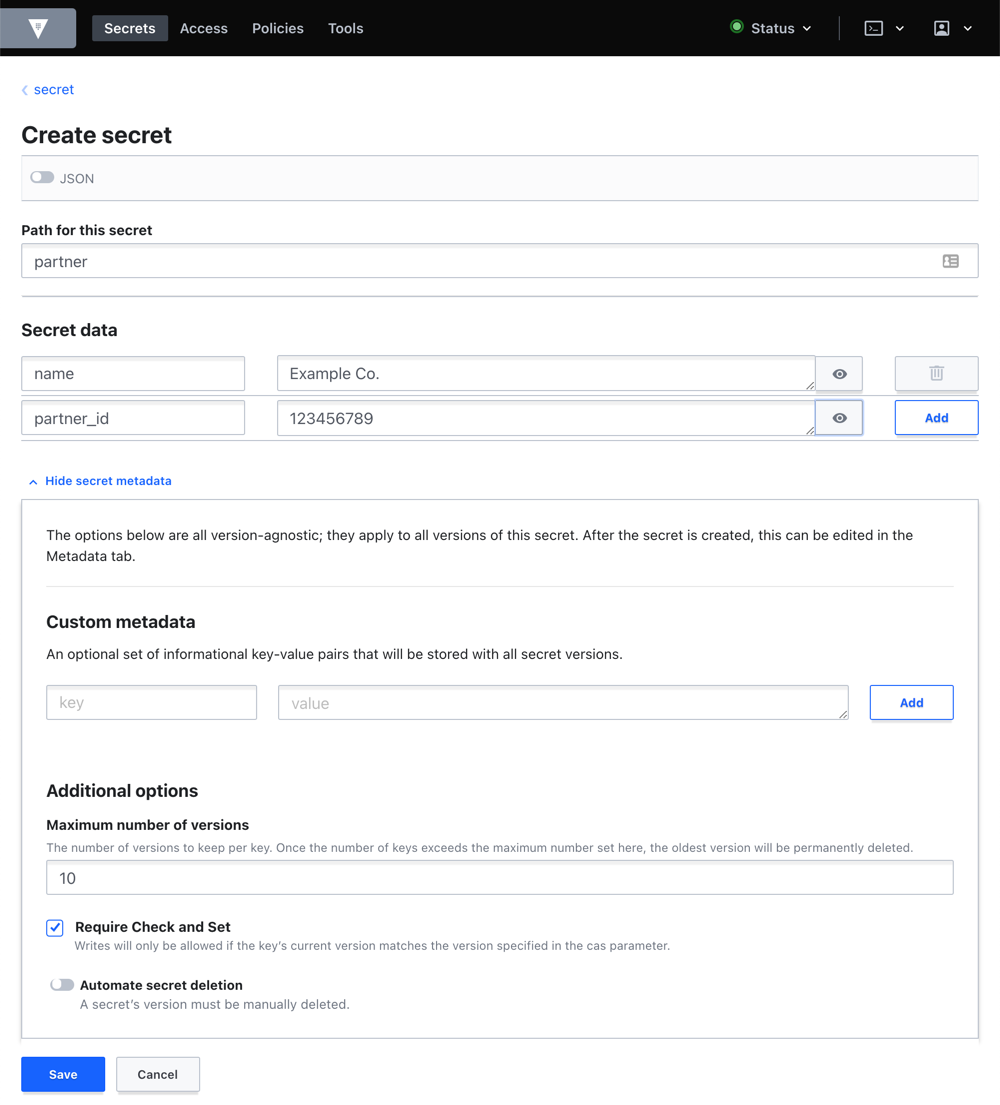
Additional discussion
Q: How do I enter my secrets without exposing the secret in my shell's history?
As a precaution, avoid passing your secret as a part of the CLI command so that the secret won't appear in the history file. Here are some techniques you can use.
Option 1: Use a dash "-"
An easy technique is to use a dash "-" and then press Enter. This allows you to
enter the secret on a new line. After entering the secret, press Ctrl+d to
end the pipe which will write the secret to the Vault.
$ vault kv put kv-v1/eng/apikey/Google key=-

AAaaBBccDDeeOTXzSMT1234BB_Z8JzG7JkSVxI
<Ctrl+d>
Option 2: Read the secret from a file
You can use a file to pass the key-value pairs. Create a file named
apikey.json that defines the key field.
$ tee apikey.json <<EOF
{
  "key": "AAaaBBccDDeeOTXzSMT1234BB_Z8JzG7JkSVxI"
}
EOF
Create a secret at path kv-v1/eng/apikey/Google with keys and values defined
in apikey.json.
$ vault kv put kv-v1/eng/apikey/Google @apikey.json
Option 3: Disable all vault command history
The first two options ensure that the contents of the secret do not appear in the shell history. The secret path would still be accessible through the shell history.
You can configure your shell to avoid logging any vault commands to your
history.
In bash, set the history to ignore all commands that start with vault.
$ export HISTIGNORE="&:vault*"
Q: How do I save many values at once?
The tutorial examples demonstrate a secret with a single key-value pair. It is possible to provide many key-value pairs in a single command.
Create a secret at path kv-v1/dev/config/mongodb that sets the url,
db_name, username, and password.
$ vault kv put kv-v1/dev/config/mongodb \
        url=foo.example.com:35533 \
        db_name=users \
        username=admin password=passw0rd
You can pass a file containing many key-value pairs to the command.
Create a file named mongodb.json that defines the url, db_name, username,
and password fields.
$ tee mongodb.json <<EOF
{
    "url": "foo.example.com:35533",
    "db_name": "users",
    "username": "admin",
    "password": "pa$$w0rd"
}
EOF
Create a secret at path kv-v1/dev/config/mongodb with keys and values defined
in mongodb.json.
Q: How do I store secrets generated by Vault in KV secrets engine?
Assuming that you have AppRole auth method enabled (refer to the AppRole Pull Authentication tutorial).
The following command retrieves the Secret ID of the jenkins role, encode it
with base64, and stores the value in the kv-v1/secret-id path.
$ vault kv put kv-v1/secret-id \
   jenkins-secret-id="$(vault write -f -field=secret_id auth/approle/role/jenkins/secret-id | base64)"
Output:
Success! Data written to: kv-v1/secret-id
Knowledge checks
A quiz to test your knowledge.
How does
vault kv patchdiffer fromvault kv putwhen you update a secret at an existing path?🔘
patchdeletes the previous version, whileputkeeps it.🔘
patchmerges only the fields you send, whileputoverwrites the entire secret value.🔘
patchworks only for metadata, whileputworks only for secret data.🔘
patchreads the current value, whileputwrites a new value.❌
patchdeletes the previous version, whileputkeeps it.✅
patchmerges only the fields you send, whileputoverwrites the entire secret value.❌
patchworks only for metadata, whileputworks only for secret data.❌
patchreads the current value, whileputwrites a new value.Why does KV v2 versioning help when a secret is updated or removed by mistake?
KV v2 keeps multiple versions of a secret, so you can read earlier data, recover from accidental changes, and compare the current version to previous ones.
What does a Check-and-Set operation protect against in the KV v2 secrets engine?
🔘 It prevents clients from reading secret metadata.
🔘 It requires every secret to use custom metadata before Vault stores it.
🔘 It prevents unintentional overwrites by requiring the expected current version.
🔘 It automatically deletes older versions after each write.
❌ It prevents clients from reading secret metadata.
❌ It requires every secret to use custom metadata before Vault stores it.
✅ It prevents unintentional overwrites by requiring the expected current version.
❌ It automatically deletes older versions after each write.
Next steps
This tutorial demonstrated the versioned KV secrets engine (kv-v2) feature. To
integrate the KV secrets engine into your existing application, you must
implement the Vault API to do that. As an alternative, you can use
Vault Agent which reduces the amount of code change introduced to
your application.
The Vault Agent Templates tutorial provides an end-to-end example.