Authenticate users in HCP Vault Dedicated
Before a client can interact with Vault, the client must authenticate against an auth method to get a token. This token has policies attached to govern the behavior of the client.
In this tutorial, Oliver will enable and configure the AppRole auth method to allow workloads, the app persona, to authenticate with Vault.
Like secrets engines and policies, you enable auth methods in
a namespace. The auth method enabled on the admin namespace is only
available to the admin namespace, and generates a token available to use
against the admin namespace. The policies attached to the token dictate which
namespaces the token can access.
Prerequisites
- Completed the Create a Vault Cluster on HashiCorp Cloud Platform (HCP) tutorial.
- Completed the Access your HCP Vault Dedicated cluster tutorial.
Enable AppRole auth method
(Persona: operations)
You have to enable the AppRole auth method before you can authenticate with it.
In the Vault UI, make sure that current namespace is
admin/.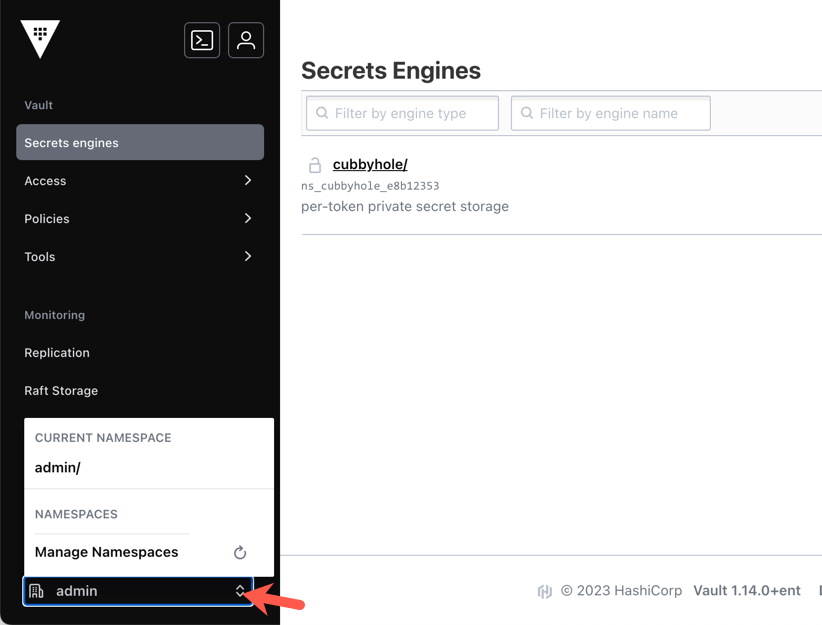
Click Access > Authentication methods.
Click Enable new method.
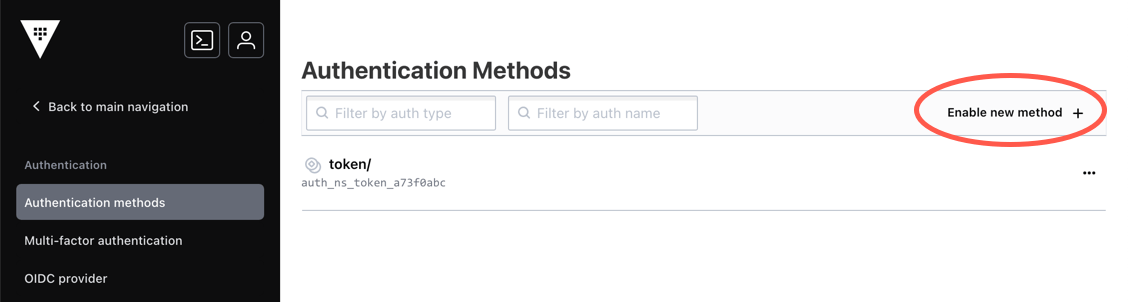
Select AppRole and click Next.
Leave the path value unchanged and click Enable Method.
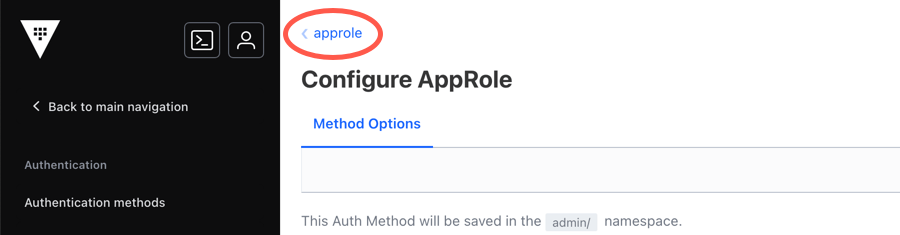
Without making any change, click < approle to view its current configuration.
Create a role with policy attached
(Persona: operations)
When you enabled the AppRole auth method, you mounted it at the default /auth/approle
path. In this example, you are going to create a role for the app persona with
tester policy attached.
Create the webapp role with the generated token's time-to-live (TTL)
set to 1 hour and the max TTL up to 4 hours from the time of its creation.
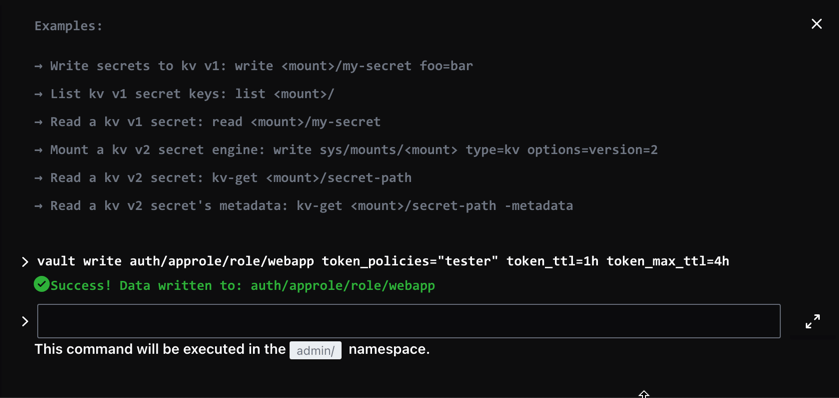
Click the Vault CLI shell icon to open a command shell in the browser.

Copy the provided
vault writecommand.$ vault write auth/approle/role/webapp token_policies="tester" token_ttl=1h token_max_ttl=4hPaste the command into the command shell in the browser and press the enter button.
Generate RoleID and SecretID
(Persona: operations)
The RoleID and SecretID are like a username and password that a machine or app uses to authenticate.
To retrieve the RoleID, invoke the auth/approle/role/<ROLE_NAME>/role-id
endpoint. To generate a new SecretID, invoke the
auth/approle/role/<ROLE_NAME>/secret-id endpoint.
Click the Vault CLI shell icon to open a command shell.
Read the RoleID.
$ vault read auth/approle/role/webapp/role-idExample output:
Key     Value
role_id b6ccdcca-183b-ce9c-6b98-b556b9a0edb9
Generate a new SecretID of the
webapprole.$ vault write -force auth/approle/role/webapp/secret-idKey Value secret_id 735a47cc-7a98-77cc-0128-12b1e96a4157 secret_id_accessor 3ab305d1-1eab-df4b-4079-ef7135635c49 ...snip...The
-force(or-f) flag forces thewriteoperation to continue without any data values specified. Or you can set parameters such ascidr_list.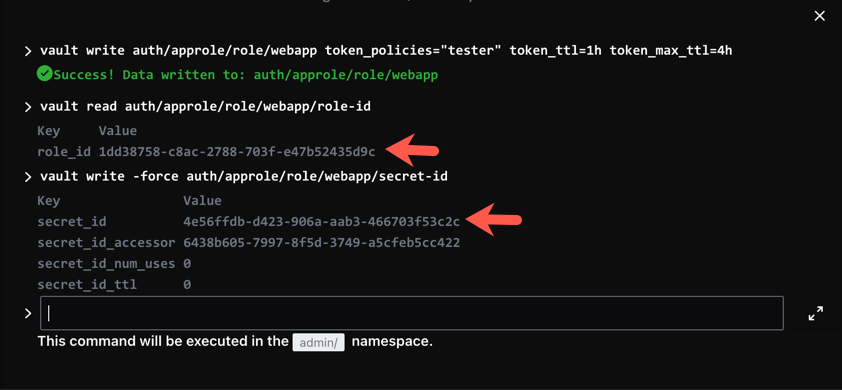
The acquired
role-idandsecret-idare the credentials that your trusted application uses to authenticate with Vault.
Test and validate
(Persona: app)
The client (in this case, webapp) uses the RoleID and SecretID passed by the
admin to authenticate with Vault. If webapp did not receive the RoleID and/or
SecretID, the admin needs to investigate.
To login, use the
auth/approle/loginendpoint by passing the RoleID and SecretID.Example:
$ vault write auth/approle/login \
    role_id="675a50e7-cfe0-be76-e35f-49ec009731ea" \
    secret_id="ed0a642f-2acf-c2da-232f-1b21300d5f29"
Example output:
Key                     Value
---                     -----
token                   hvs.BMXSIJvlm6OjYeWiBmkLxnhgkPAkr3Lx8CbvU1WRnCGTwufIGicKImh2cyDYN0hhaWJIcE5yQUlRWGMxYzZFc05DcDUuWFA1T2oQjQI
token_accessor          FILPoDWPoqd5zeo62HAoWexN.0YFbA
token_duration          1h
token_renewable         true
token_policies          ["default" "tester"]
identity_policies       []
policies                ["default" "tester"]
token_meta_role_name    webapp
Vault returns a client token with
defaultandtesterpolicies attached.Store the generated token value in an environment variable named,
APP_TOKEN.Example:
$ export APP_TOKEN="hvs.BMXSIJvlm6OjYeWiBmkLxnhgkPAkr3Lx8CbvU1WRnCGTwufIGicKImh2cyDYN0hhaWJIcE5yQUlRWGMxYzZFc05DcDUuWFA1T2oQjQI"Access the secrets at
secret/test/webappauthenticated with theAPP_TOKEN.$ VAULT_TOKEN=$APP_TOKEN vault kv get secret/test/webapp ====== Metadata ====== Key Value --- ----- created_time 2021-06-17T03:06:34.063027186Z deletion_time n/a destroyed false version 1 ===== Data ===== Key Value --- ----- api-key ABC0DEFG9876
Knowledge checks
A quiz to test your knowledge.
How do the RoleID and SecretID function within the AppRole auth method?
🔘 They serve as the namespace identifier and the policy name for the application.
🔘 They act similar to a username and password that an application uses to authenticate with Vault.
🔘 They function as the encryption key and decryption key for the Key/Value secrets engine.
🔘 They replace the need for a client token by directly granting access to secrets.
❌ They serve as the namespace identifier and the policy name for the application.
✅ They act similar to a username and password that an application uses to authenticate with Vault.
❌ They function as the encryption key and decryption key for the Key/Value secrets engine.
❌ They replace the need for a client token by directly granting access to secrets.
What does Vault return when a client successfully authenticates using the AppRole auth method?
🔘 A new SecretID
🔘 A root token
🔘 A client token with the role's policies attached
🔘 The requested secret data
❌ A new SecretID
❌ A root token
✅ A client token with the role's policies attached
❌ The requested secret data
When you authenticate using an auth method enabled in a specific namespace, what determines which namespaces the resulting token can access?
The policies attached to the generated token dictate which namespaces the token can access, which can include child namespaces if the policies grant those permissions.
Summary
In this tutorial you enabled the AppRole auth method, and retrieved the role ID and secret ID. You can learn more in the AppRole pull authentication tutorial.
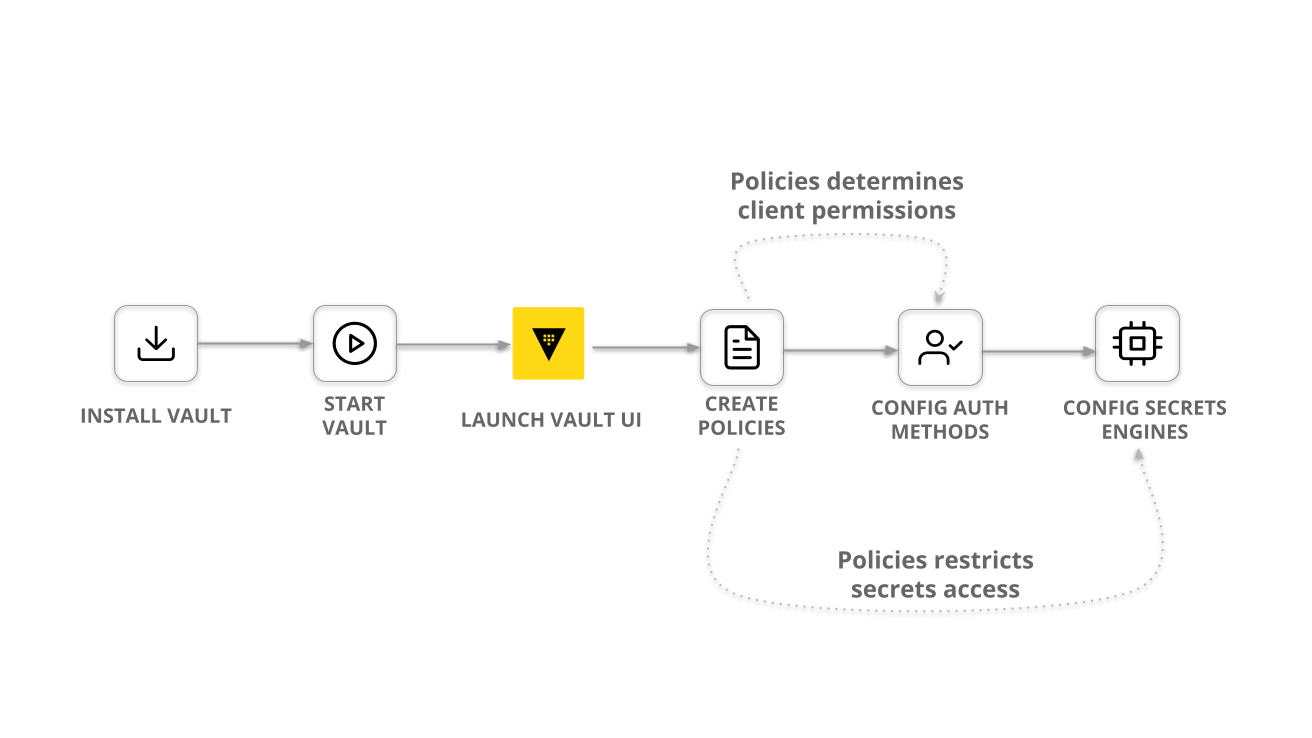
In this series of tutorials, you completed the most common Vault operations workflow.
The differences between the HCP Vault Dedicated and self-managed Vault are:
- Vault Dedicated runs Vault Enterprise
- The root namespace of Vault Dedicated is
admin
You can follow any of the Vault tutorials with HCP Vault Dedicated. Set your
VAULT_ADDR, VAULT_NAMESPACE, and VAULT_TOKEN variables with the
appropriate values.
If you are new to Vault, follow the Vault foundations series to learn the core concepts and features of Vault.
Next steps
In the next tutorial, you will learn how to configure and manage more advanced features for your HCP Vault cluster, including:
- Enable disaster recovery replication
- Lock and unlock the cluster
- Scale the cluster between different tiers