Access a HCP Vault Dedicated cluster
Now that Oliver created a new HCP Vault Dedicated cluster, they will need to perform some initial configuration to support HashiCups use case. A good practice is to first enable one or more supported auth methods to support user authentication and create a limited scope admin policy to configure Vault.
Once Oliver and the HashiCups Vault admins are able to log in, they will enable additional auth methods to authenticate their workloads, and enable secrets engines to store or generate secrets.
The cluster starts at the top-level namespace called
admin. Namespaces
enable you to create isolated Vault environments. Refer to the
HCP Vault Dedicated namespace considerations
tutorial
to learn more.
Vault Dedicated provides the same type of access as a self-hosted Vault cluster. You can access it through a command line interface (CLI) using the Vault binary, through the Vault API using common programming languages or tools such as cURL, or by using the Vault User Interface (UI).
Prerequisites
- Completed the Create a Vault Cluster on HashiCorp Cloud Platform (HCP) tutorial.
Access the Vault cluster
(Persona: operations)
Oliver will access the HCP Vault Dedicated cluster using the admin token. An admin token is a powerful token, similar to having local administrator or root access to your operating system. You should use the admin token for initial configuration or emergency access.
From the Overview page, click Generate token in the New admin token card.

Admin tokens have a TTL of 6 hours. While you can generate a new admin token any time, you should use these tokens for initial configuration and emergency access. For general access, you should enable an auth method for your HCP Vault administrators and create a custom policy that has the required permissions.
Click Copy to copy the new token to your clipboard.

Click Launch web UI.

The Launch web UI button connects you to the Vault UI through the HCP Proxy. Recall from the previous tutorial that the HCP Proxy allows you to connect to your HCP Vault cluster's UI with, or without enabling public access.
When the Vault UI launches in a new tab/window, enter the token in the Token field.

Click Sign In.
You are now authenticated to Vault using the admin token, and in the admin namespace.
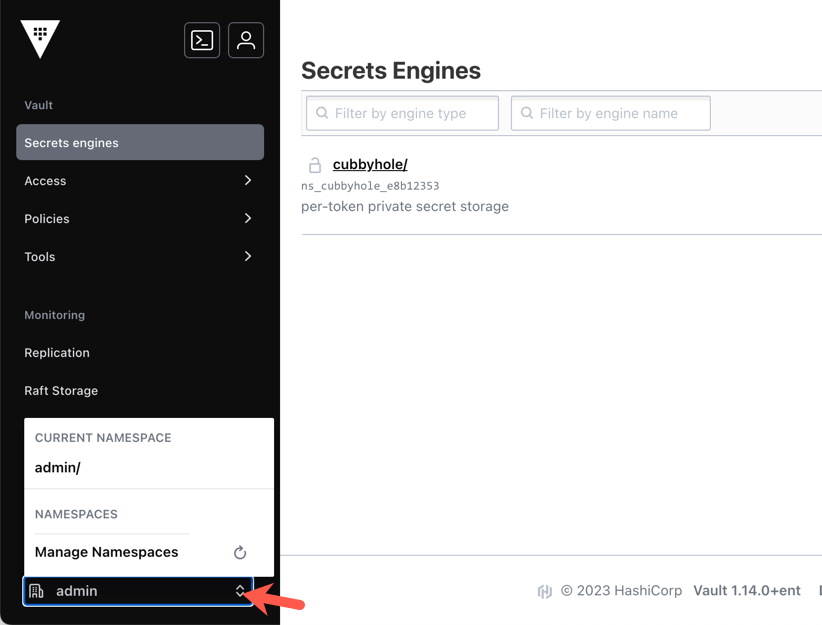
You can now perform the initial configuration of your Vault cluster.

Knowledge checks
A quiz to test your knowledge.
Which top-level namespace are you placed in by default when you access your HCP Vault Dedicated cluster using the generated admin token?
🔘
root/🔘
system/🔘
admin/🔘
default/❌
root/❌
system/✅
admin/❌
default/How long is the admin token valid for after you generate it from the HCP Portal?
🔘 1 hour
🔘 6 hours
🔘 24 hours
🔘 It never expires until manually revoked
❌ 1 hour
✅ 6 hours
❌ 24 hours
❌ It never expires until manually revoked
How do you pass the target namespace name when using the Vault HTTP API with cURL?
You can pass the target namespace name by specifying it in the
X-Vault-Namespaceheader, by setting an environment variable to pass to the header, or by prepending the API endpoint with the namespace name (e.g.,<namespace_name>/auth/token/lookup-self).
Summary
You learned how to log into HCP Vault using the UI, CLI, and API using the token
auth method. Once logged in, you verified you authenticated to the admin
namespace. In Vault Enterprise, each namespace is its own isolated Vault
environment.
Next steps
Next you will learn more about creating and managing namespaces in the Enable multi-tenancy tutorial.