Organizing resources
Foundational organization concepts
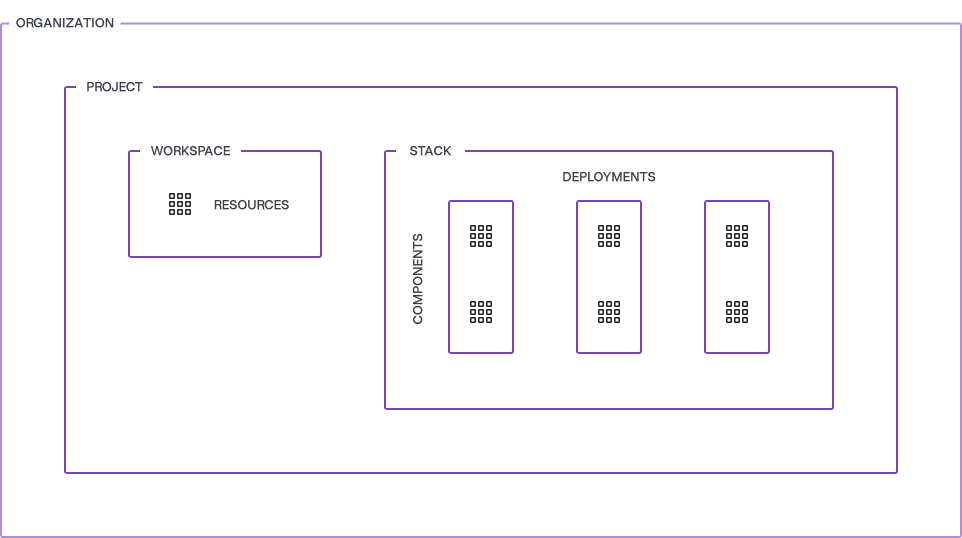
HCP Terraform helps you organize the infrastructure resources you want to manage with Terraform. It begins with the organization concept, which corresponds to your entire organization. You can have one or more projects under the organization. Each project then manages a collection of workspaces and Stacks as applicable. Workspaces and Stacks are containers managing Terraform configurations and their associated state files.
Access management
HCP Terraform bases access on three components:
- User accounts
- Teams
- Permissions
HCP Terraform uses user accounts to authenticate, authorize, personalize, and track user activities. A team is a container used to group related users together and helps to assign access rights. A user can be a member of one or more teams. Permissions are the specific rights and privileges granted to groups of users to perform certain actions or access particular resources within HCP Terraform.
When managing your HCP Terraform environment, we recommend implementing SAML/SSO for user management, in conjunction with RBAC. SAML/SSO provides a centralized and secure approach to user authentication, while RBAC allows you to define and manage granular access controls based on roles and permissions. By combining SAML/SSO and RBAC, you can streamline user onboarding and offboarding processes, enforce strong authentication measures, and ensure that users have the appropriate level of access to resources within your Terraform environment. This integrated approach enhances security, simplifies user management, and provides a seamless experience for you and your team members.
Delegate access
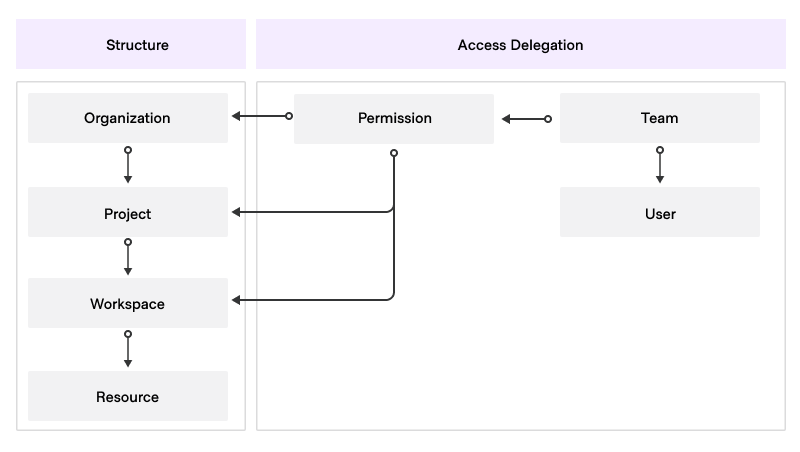
In HCP Terraform it is possible to assign team permissions at the following levels:
- Organization
- Project
- Workspace/Stack
The set permission level defines the scope of this permission. For example, a permission assigned at one of the following.
- Workspace-level applies only to that workspace and not to any other workspace.
- Stack-level applies only to that Stack and not to any other Stack.
- Project-level applies to the project and the workspaces and Stacks it manages.
- Organization-level applies everywhere in that organization.
A word on naming conventions
You create and name a number of entities (teams, projects, workspaces, and so on) as you configure your HCP Terraform instance. We recommend that you create and maintain a naming convention document which includes the naming conventions for each entity, as well as any other conventions you decide to use such as prefixes or suffixes. This document helps ensure that your Terraform experience is well-organized as you scale out. Pass this document to all new internal clients to your HCP Terraform service to standardize their approach to operations.
Organizations, projects, workspaces, and Stacks
Organizations
The organization in Terraform Enterprise serves as the highest-level construct, encompassing various components and configurations. These include the following:
- Access management
- Single sign-on
- Users and teams
- Organization API tokens
- Projects, workspaces, and Stacks
- SSH keys
- Private registry
- VCS providers
- Variable sets
- Policies
- Agent pools
We recommend centralizing core provisioning work within a single organization in HCP Terraform to ensure efficient provisioning and management.
This approach is compatible with a multi-tenant environment where you have to support multiple business units (BUs) within the same organization. Our robust role-based access control system combined with projects ensures that each BU has its own set of permissions and access levels. Projects enable you to divide workspaces, Stacks, and teams within the organization. We discuss them in more detail below.
Terraform Enterprise uses workload concurrency to maintain a run queue, and a worker RAM allocation. Consider the following points.
- The default concurrency is ten, meaning Terraform Enterprise spawns a maximum of ten worker containers and thus processes 10 workspace or Stack deployment runs simultaneously.
- The system allocates 2048MiB of RAM to each agent container by default. For most workloads, this is sufficient, but the platform team must be aware that for workloads requiring RAM residency larger than this, the container daemon harvests the container if it runs out of memory (OOM) and provides an undesirable error to the user. Proactive resource monitoring and reporting is thus key.
- For VM-based installations, the default RAM requirements for onboard agents is thus 20480MiB. If larger RAM requirements are necessary, consider vertically scaling the compute nodes, but we recommend that customers instead make use of HCP Terraform agents to offload the processing of large workloads to a dedicated agent pool. HCP Terraform agents also work for Terraform Enterprise. In this case, switch the affected workspaces or Stacks from a remote execution type to an agent execution type.
- For active/active configurations, system concurrency is per active node (HashiCorp support up to a maximum of five nodes in active/active setups).
- Similar consideration applies to CPU requirements but RAM considerations are a higher priority due to the need to contain the Terraform graph during operation.
- Note also that in the default configuration, if the instance is processing ten concurrent non-production runs, subsequent submission of production runs have to wait until concurrency becomes available which may delay these runs. This is a key consideration for the platform team to manage.
- We recommend liaising with your HashiCorp Solutions Engineer as necessary.
Naming convention
We recommend the following naming convention for organizations:
<customer-name>-prod: This organization serves as the main organization which processes what the platform team considers as production workloads.<customer-name>-test: This organization is for integration testing and special proofs of concept conducted by the platform team.
Access management and permissions
This section extends public documentation on the subject of HCP Terraform RBAC.
The owners team
When establishing an organization, HCP Terraform creates an owners team automatically. You cannot remove this fundamental team.
As a member of the owners team, you have comprehensive access to all aspects of the organization, including policies, projects, workspaces, Stacks, VCS providers, teams, API tokens, authentication, SSH keys, and cost estimation. HCP Terraform reserves a number of team-related tasks for the owners team. You cannot delegate these tasks.
- Creating and deleting teams.
- Managing organization-level permissions granted to teams.
- Viewing the full list of teams (including teams marked as secret(opens in new tab)).
You can generate an organization-level API token to manage teams, team membership, workspaces and Stacks. It is important to note that this API token does not have permission to perform plans and applies. Before assigning a workspace or Stack to a team, you can use either a member of the organization owners group or the organization API token to carry out initial setup.
Organization-level permissions
Key organization-level RBAC permissions and their respective purposes are below.
- Manage policies: Allows the platform team to create, edit, read, list, and delete the organization's Sentinel policies. This permission also grants you access to read runs on all workspaces for policy enforcement purposes, which is necessary to set enforcement of policy sets(opens in new tab).
- Manage run tasks: Enables the platform team to create, edit, and delete run tasks within the organization.
- Manage policy overrides: Permits the platform team to override soft-mandatory policy checks. This permission also includes access to read runs on all workspaces for policy override purposes.
- Manage VCS settings: Allows the platform team to manage the VCS providers(opens in new tab) and SSH keys(opens in new tab) available within the organization.
- Manage private registry: Grants the platform team the ability to publish and delete providers and modules in the organization's private registry(opens in new tab). These permissions are only available to organization owners.
- Manage membership: Enables the platform team to invite users to the organization, remove users from the organization, and add or remove users from teams within the organization. This permission allows the platform team to view the list of users in the organization and their organization access. However, it does not provide the ability to create teams, modify team settings, or view secret teams.
As you review the preceding permissions, it becomes clear that many of them are not required for typical users. Therefore, we recommend granting these organization-wide permissions to a select group of your team members, reserving them for the most senior members on your team and restricting access for members of the development team. This approach helps prevent unintended modifications or disruptions to your organization's configuration.
It is crucial to treat the organization token as a secret and limit access to only privileged staff. Also, you have the flexibility to create additional teams within your organization and grant them specific organization-level permissions to suit the needs of the team and maintain proper access control.
Setting up organization-level access
Because of the broad elevated privileges that the owners team has, we recommend limiting membership to a small group of trusted users (that is, the HCP Terraform platform team). Create additional teams as needed to manage areas of the organization as necessary. For example, the security team may need to manage policies. We would generally recommend automating everything.
You may need to make adjustments to this model based on the breakdown of roles and responsibilities in your organization. If you do, update this matrix based on your context and make sure you update your HCP Terraform deployment documentation managed by the CCoE.
Projects
HCP Terraform projects(opens in new tab) are containers for one or more workspaces and Stacks. You can attach a number of configuration elements at the project level, which are then automatically shared with all workspaces and Stacks managed by this project:
- Team permissions
- Variable set(s)
- Policy set(s)
Because of the inheritance mechanism, projects are the main organization tool to delegate the configuration and management responsibilities in a multi-tenant setup. The two standard project-level permissions used to achieve this delegation are:
- Admin - provides full control over the project (including deleting the project).
- Maintain - provides full control of everything in the project, except the project itself.
Variations on the proposed delegation model are possible by creating your own custom permission sets and assigning those to the appropriate teams in your organization. The benefits of this are:
- Increased agility with workspace organization:
- Add related workspaces or Stacks to projects to simplify and organize a team's view of the organization.
- Teams can create and manage infrastructure in their designated project without requesting administrator access at the organization level.
- Reduced risk with centralized control:
- Project permissions allow teams to have administrative access to a subset of workspaces and Stacks.
- This helps application teams manage their workspaces and Stacks without interfering with other teams' infrastructure and allow organization owners to maintain the principle of least privilege.
- Best efficiency with self-service:
- Projects integrate no-code(opens in new tab) provisioning, so teams with project-level administrator permissions can provision no-code modules directly into their project without requiring organization-wide workspace management privileges. No-code module deployment is into new Terraform Enterprise workspaces, which is a consideration for platform teams managing license consumption.
Project design
When deploying HCP Terraform at scale, a key consideration is the effective organization of your projects to ensure maximum efficiency. Projects are typically allocated to an application team. Variable sets are either assigned at the project level (for example for cost-codes, owners, and support contacts) and at the workspace level depending on requirements.
Automated onboarding is critical for the success of your project. Use either the HCP Terraform and Terraform Enterprise provider(opens in new tab) or the HCP Terraform API to automate the creation of the application team project and initial workspaces or Stacks and assign the necessary permissions to the teams (we recommend the former). This ensures that project allocation is consistent at scale. Consider this approach as a landing zone concept. Avoid any manual tasks required to onboard new teams as this results in platform team toil at scale.
We recommend assigning separate projects for each application within a business unit. The suggested naming convention for projects is: <business-unit-name>-<application-name>.
Access management and permissions
Create teams without requiring any of the aforementioned organization-level permissions. Instead, permissions can be explicitly granted at the project and workspace levels. We recommend setting permissions at the project level as it offers better scalability and allows teams to have the flexibility to create their own workspaces and Stacks when necessary. By granting permissions at the project level, you can effectively manage access control while providing teams with the necessary privileges. Below are the permissions you can grant and their respective functionalities:
- Read: Users with this access level can view any information on the workspace, including state versions, runs, configuration versions, and variables. However, they cannot perform any actions that modify the state of these elements.
- Plan: Users with this access level have all the capabilities of the
readaccess level, and in addition, they can create runs. - Write: Users with this access level have all the capabilities of the
planaccess level. They can also execute functions that modify the state of the workspace, approve runs, edit variables on the workspace, and lock/unlock the workspace. - Admin: Users with this access level have all the capabilities of the
writeaccess level. Also, they can delete the workspace, add and remove teams from the workspace at any access level, and have read and write access to workspace settings such as VCS configuration.
Variations on the standard roles are possible by creating your own custom permission sets and assigning those to the appropriate teams in your project. We recommend using workspace-level permissions to demonstrate segregation of duty for regulatory compliance, such as to limit access to production workspaces to production services teams, and the converse for application development teams.
Workspace
A workspace is the most granular container concept in HCP Terraform. They serve as isolated environments where you can independently apply infrastructure code. Each workspace maintains its own state file, which tracks the resources provisioned within that specific environment.
This separation allows for distinct configurations, variables, and provider settings for each workspace. By organizing your workspaces under their respective projects, you establish a clear and hierarchical relationship among different infrastructure components.
Workspace design
When designing workspaces, it is important to consider the following:
- Workspace isolation: Isolate each workspace from other workspaces to prevent unintended changes or disruptions. This isolation ensures that changes made to one workspace do not affect other workspaces.
- Workspace naming: We recommend following a naming convention for workspaces to maintain consistency and clarity. The recommended format, with a maximum of 90 characters, is as follows:
<business-unit>-<app-name>-<layer>-<env>. By incorporating the business unit, application name, layer, and environment into the workspace name, you can identify and associate workspaces with specific components of your infrastructure.
Naming convention
We recommend following a naming convention for workspaces to maintain consistency and clarity. The recommended format is: <business-unit>-<app-name>-<layer>-<env> where:
<business-unit>: The business unit or team that owns the workspace.<app-name>: The name of the application or service that the workspace manages.<layer>: The layer of the infrastructure that the workspace manages (for examplenetwork,compute,data,app).<env>: The environment that the workspace manages (for exampledev,test,prod).
By incorporating the business unit, application name, layer, and environment into the workspace name, you can identify and associate workspaces with specific components of your infrastructure. We recommend a maximum of ninety characters but this is not a hard limit.
Many application teams do not need the layer component in the name as the infrastructure they need for their application is clear. However, to standardize, consider use of the string main or app in place of the layer component as this helps maintain consistency across the organization. This field is also useful for delineation if the team splits into two as your business grows.
Multi-workspace patterns
Most Terraform deployments use more than one workspace to manage application infrastructure, with the baseline being one workspace per environment. Do not aim to manage an application's entire infrastructure in a single workspace. It is not recommended due to considerations such as prod/nonprod separation, blast radius, volatility, team responsibilities, resource scale, graph size, memory requirements and plan times. We explore these concepts in Best Practices - Workspaces - Terraform Enterprise(opens in new tab).
Technical restrictions of the Terraform language can also force the use of multiple workspaces. For example, due to known after apply restrictions, you cannot plan some configurations in one operation to create a Kubernetes cluster and use it to configure a provider, or to create a Vault cluster then configure secrets engines.
Splitting the configuration over multiple workspaces solves these problems, but at the cost of increased complexity.
- Use orchestration to ensure workspaces run when required based on changes to upstream workspaces, and in the correct sequence. This can be in the form of workspace run triggers, Terraform orchestration code (
terraform_workspace_runresource), or CI/CD pipelines. - Using the attributes of one resource as an input for a dependent resource is more difficult if they are in different workspaces, as it requires data sources to pull the attributes, either from upstream workspace outputs or directly from the infrastructure itself.
- It is more difficult for users to keep track of resources when spread over multiple workspaces
Thus the overall function of a collection of workspaces may depend on multiple Terraform configurations, workspace variables and variable sets, workspace outputs and corresponding data sources, Terraform Enterprise workspace state sharing permissions, workspace run triggers, and CI/CD pipeline definitions.
Terraform Stacks
Instead of coordinating a collection of separate Terraform configurations and workspaces, Terraform Stacks introduce a new configuration layer that better represents the patterns of infrastructure at scale. You can define complex infrastructure as a set of interconnected components, repeat that infrastructure across multiple environments or regions, and manage it all from a single, centralized codebase.
With Stacks, you can access the following capabilities.
- Split infrastructure into smaller components: break up large configurations into reusable parts, with clear dependencies defined through standard Terraform inputs and outputs
- Reuse the same configuration across environments: define a Stack once and deploy it multiple times while managing each deployment independently.
- Codify relationships between components: avoid complex, scattered data sources and workspace wiring by declaring relationships directly in the Stack configuration.
Stacks building blocks
The core building blocks of a Stack are components and deployments.
Components represent the individual layers of your infrastructure, for example, networking, databases, or application services. Each component wraps a standard Terraform module and can declare dependencies on other components by consuming their outputs as inputs. This makes it straight forward to model complex systems with clear relationships between layers, without splitting them into separate workspaces.
Deployments allow you to repeat the component configuration across multiple environments, regions, or cloud accounts. For example, you might deploy the same configuration to dev, staging, and production, each as a separate deployment. Plan and approve each deployment independently, giving you control over the scope of each change.
Everything-as-code
One of the core principles of Stacks is to codify the entire behavior of infrastructure within version-controlled configuration files. This reduces reliance on external settings, avoids hidden behavior, and ensures deployments are predictable.
Specifically, Stacks follow a GitOps-style model for configuration management: Define non-secret inputs explicitly in the deployment configuration and stored in version control. There is no equivalent to workspace variables, and no hidden platform settings that affect how a Stack behaves. The goal is that the full intent and structure of a Stack is clear from the code alone.
Workload identity
Consistent with the everything-as-code principle, the preferred form of authentication in Stacks is workload identity. Define identity directly in the Stack configuration using identity_token blocks in the deployment configuration, and explicit provider configuration in each component.
This approach manages declarative provider authentication, avoiding the need for long-lived secrets or platform-managed environment variables.
Managing secrets
Stacks do not use workspace variables. Instead, use variable sets to manage secrets such as tokens, passwords, and credentials for providers that do not support workload identity.
Pull these values from variable sets as defined in the deployment configuration. Mark short-lived credentials provided using a variable set as ephemeral to ensure secrets are not persisted in state. Persist longer-lived secrets, such as license keys, in state using the stable keyword(opens in new tab). Version all non-secret configuration in Stack configuration files.
Other differences from workspaces
Stacks introduces several capabilities that are not available in traditional workspace-based Terraform workflows. These features enable more flexible composition of resources and more dynamic configuration patterns, relevant to complex, multi-environment or multi-region setups.
Deferred changes
Stacks support deferred changes, a mechanism that allows Terraform to satisfy all resource dependencies using iterative plan and apply steps. This enables configurations that would otherwise fail due to known_after_apply attributes (such as creating a Kubernetes cluster and then deploying a Helm chart into it), to coexist within a single deployment. Terraform plans and applies what it can, then re-evaluates the configuration based on updated state, repeating this process until the deployment converges.
Explicit provider definition and iteration
In Stacks, define all providers and configured explicitly. HCP Terraform passes each provider as a named argument to the components that require it, which makes provider usage transparent and avoids assumptions based on default configurations or implicit inheritance from the root module.
This explicit model also enables provider iteration: a Stack can dynamically configure multiple provider instances using for_each to support scenarios like deploying infrastructure across multiple regions, accounts, or subscriptions. Each instance is explicitly defined, passed to the relevant components, and orchestrated within a single deployment, without duplicating component logic.
What are the best use cases for Stacks?
Stacks simplifies and scales Terraform workflows that would otherwise become complex or repetitive using traditional workspaces and modules. They are well suited to:
Complex, modular infrastructure
Infrastructure that is too large to manage as a single Terraform configuration or that you cannot plan in a single operation benefits from the component-based structure and partial plan behavior of Stacks.
Infrastructure repeated across contexts
Stacks allows repeatable and consistent configurations across multiple environments, regions, or provider instances, with the flexibility to manage and approve each instance independently.
Common patterns and use cases
Multi-environment applications
Deploy the same infrastructure pattern across dev, staging, and production with environment-specific parameters. Specify auto-approval of plans based on the environment and the risk of the proposed changes.
Multi-tenant infrastructure
Manage infrastructure for multiple customers or teams using the same Stack definition, with tenant-specific deployments.
Cross-account or cross-subscription infrastructure
Use dynamic provider iteration or separate deployments to manage resources across multiple cloud accounts or subscriptions from a single Stack.
Landing zones
Implement foundational infrastructure (for example networking, identity, policy) as a reusable Stack with consistent configuration across environments or business units.
Multi-region AWS deployments
Use multiple deployments or for_each over regions within the same deployment to manage infrastructure in multiple AWS regions within the same Stack.
What are the best use cases for workspaces?
While Stacks offers more structure and flexibility for complex or large-scale deployments, workspaces remain a suitable choice for smaller projects or scenarios that benefit from strict separation between environments.
Small, self-contained projects
Workspaces are a good fit when managing the entire infrastructure using a single Terraform configuration, and planned/applied in one operation without orchestration.
Hard separation between environments
Each workspace maintains its own isolated state file, making workspaces well suited to scenarios requiring strict separation between environments, such as compliance boundaries, production safeguards, or minimal blast radius.
Branch-per-environment workflows
If your team uses a branching strategy where each environment maps to a separate Git branch (for example dev, staging, prod), workspaces align well with this model. Control promotion across environments using pull requests between branches, with HCP Terraform or CI/CD pipelines running plans in the appropriate workspace.
CI/CD-driven environment promotion
Workspaces are useful when CI/CD pipelines are mandatory to control promotion across environments or contexts. For example, when gating promotion with approvals or automated test outcomes, CI/CD systems can manage execution in different workspaces based on pipeline stage or branch.
Stack configuration structure
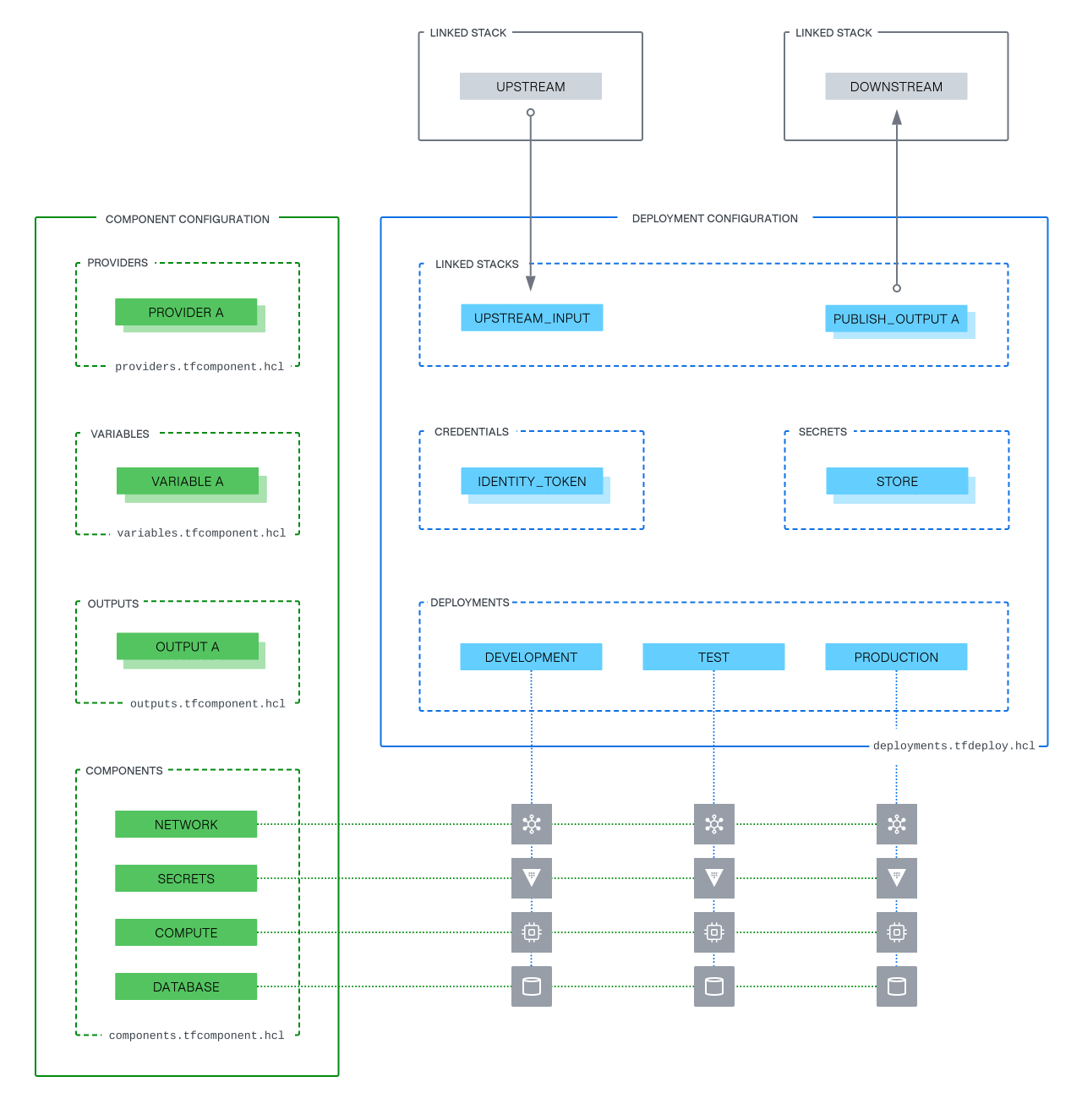
The diagram below illustrates the division of Stack configuration into two key sets of files: *.tfcomponent.hcl and *.tfdeploy.hcl. Together, they define the structure, behavior, and lifecycle of a Stack.
Component configuration (*.tfcomponent.hcl)
The component configuration defines the vertical structure of the Stack: the components, the inputs and outputs, and all provider configurations. These form the reusable building blocks of the Stack. All deployments reference this same component layout. They are replicas of the same structure, each instantiated in a specific environment or context.
The component configuration feels familiar to Terraform practitioners, as it follows the module composition pattern(opens in new tab). in other words, a Terraform root module that calls other Terraform modules. Both call modules that can be in the registry, a git repository, or a subdirectory. Both define and configure providers, and both define input variables and outputs. The difference is that Stacks formalizes each module call as a separate component.
Unlike a Terraform root module, the Stacks component configuration cannot include raw .tf files. This means you must place any supporting logic typically placed at the root level of a workspace, such as data sources, in a dedicated supporting component. This encourages modularity and ensures that all logic, whether functional or structural, exists within a consistent pattern. Use of a submodule is a good solution for this.
Deployment configuration (*.tfdeploy.hcl)
The deployment configuration defines one or more deployments: apply individual instances of the component configuration to specific targets such as environments, regions, tenants, or subscriptions. Each deployment represents a complete independent unit of the Stack, using the same component layout but parameterized for a specific context.
Configure deployments with input values corresponding to the variables defined in the component configuration. In addition the deployment configuration defines several other aspects of how the Stack behaves:
- Authentication, typically using
identity_tokenblocks. - Secrets injection, using variable sets.
- Deployment groups and orchestration logic, defining the conditions for auto-approval of plans.
- Upstream and downstream connections, using
upstream_inputandpublish_outputblocks, enabling Stacks to exchange data and form larger compositions.
The diagram shows multiple deployments (for example dev, staging, production) sharing the same component definitions but managed independently.
Designing and using deployments effectively
Each deployment represents a separate instance of the Stack's component configuration and maps to a single state file. During execution of a Stack, each deployment runs in its own agent.
To structure the Stack effectively, it is important to understand when to use separate deployments, how provider iteration fits in, and how this affects concurrency.
When to use deployments
Use deployments when any of the following apply.
- The entire component structure must be repeatable across distinct contexts (for example dev, staging, prod, or multiple regions/accounts).
- There is a defined roll-out sequence for promoting changes across the contexts.
- You need independent approval policies, or credentials per instance.
- There are strong isolation requirements (for example tenancy).
For stronger isolation needs, consider breaking infrastructure into separate Stacks entirely. See Linked Stacks for guidance.
When to use for_each for provider configuration
Use for_each on provider blocks in the component configuration when any of the following apply.
- You want to repeat selected components across multiple regions or accounts.
- Multiple provider instances share a common lifecycle and identity/credential model.
- You want a single deployment to manage infrastructure across those scopes.
Avoid this pattern if any of the following apply.
- You need different authentication methods, approval flows, or orchestration for each instance.
- You require separate state, identity, or lifecycle controls.
Isolation and execution boundaries
Use deployments to achieve state, credential, and orchestration separation. If isolation requirements go beyond that (for instance ownership boundaries or audit separation), use multiple Stacks and define upstream/downstream relationships using linked Stack outputs and inputs.
Parallelism versus concurrency
Within a deployment, components run in parallel within a single agent.
As each deployment runs in its own agent, take agent concurrency into account in planning. In HCP Terraform, concurrency is subject to an organization-level limit on simultaneous agent runs.
Defining multiple providers
It is possible to declare multiple providers explicitly in the component configuration using for_each. This supports use cases like deploying to multiple regions or managing resources across accounts.
- Define version constraints once as HCP Terraform shares these across all instances.
- Provider configurations must be fully specified and keyed (for example by region or tenant).
- HCP Terraform passes each provider explicitly to the components that require it.
Example: A deployment passes a list of regions. The component configuration uses for_each to create an AWS provider instance per region.
Linked Stacks
Link Stacks together to form larger systems through explicit input/output relationships. A Stack can consume outputs from another Stack and publish its own outputs for downstream Stacks to use. Declare these relationships in the deployment configuration using upstream_input and publish_output blocks.
This enables teams to build infrastructure that spans multiple domains or layers with different scopes (for example platform and application). Linked Stacks provide clear boundaries while preserving composition.
When to split infrastructure across multiple Stacks
In general, a single Stack represents a coherent unit of infrastructure. Manage, deploy, and version this as one. A 12-factor approach would suggest keeping infrastructure for all environments in the same Stack, using multiple deployments to target different contexts.
However, splitting infrastructure across multiple Stacks is appropriate in some cases:
Different lifecycle or ownership
- If different teams manage components, for example network infrastructure managed by a platform team, compute infrastructure managed by application teams.
- If different schedules apply to deployment of components, for example a shared Kubernetes cluster updated quarterly, apps deployed every day.
Shared platform infrastructure
- If deployment of multiple services onto shared resources is relevant, for example a shared EKS or AKS cluster used by several apps.
- You want to isolate app-specific infrastructure from shared foundations.
Stronger environment separation
- Your organization requires branch-per-environment workflows with different controls for prod versus non-prod.
- You want to enforce VCS policies or approvals per environment tier.
- Examples:
- One Stack for dev, and another for test + prod.
- One Stack for dev + test, and a separate Stack for prod.
Use linked Stack outputs to pass values (for example network IDs, URLs) between Stacks while maintaining ownership boundaries and separation of concerns.
Stack structure: summary of recommendations
| Use case | for_each components | Deployments | Linked Stacks |
|---|---|---|---|
| Manage everything as one unit | Yes | Yes | No |
| Repeat selected components across regions/accounts | Yes | No | No |
| Repeat the entire Stack across environments or contexts | No | Yes | No |
| Repeat across regions | Yes | Yes | Only if hard isolation needed |
| Repeat across environments (dev, staging, prod) | No | Yes | Maybe (for strict separation) |
| Use different credentials or roles per scope | No | Yes | Maybe (for org boundaries) |
| Require different orchestration or approval flows | No | Yes | Yes |
| Infrastructure managed by different teams | No | No | Yes |
| Differently scoped infrastructure (shared base infra and per-app infra) | No | No | Yes |
| Different lifecycle or release schedule | No | No | Yes |
| Require separate VCS branch or workflow | No | No | Yes |