Access secrets with the Vault Agent
There are a number of ways to access secrets stored in Vault. In this tutorial, you will learn how to use the Vault Agent to securely manage secrets for applications.
The Vault Agent is a client-side daemon that provides features such as automated authentication, secret caching, and secret renewal. In this tutorial, you will learn how to deploy the Vault Agent alongside an application to manage secrets and set up Auto-Authentication with the Kubernetes auth method.
Scenario
After a recent commit to GitHub, HCP Vault Radar detected an API key in a public repository. As a result, the security team at HashiCups informed the development team of the incident. After removing the API key from the repository, Danielle decided to use Vault Agent to access secrets for that application. Other methods include the Vault Go SDK for programmatic control and the Vault Secrets Operator for Kubernetes-native secret synchronization.
Vault Agent
Vault Agent is a client-side daemon that provides features such as automated authentication, secret caching, and secret renewal.
Danielle, a lead engineer at HashiCups, will deploy a sample application that uses the Vault Agent to retrieve secrets from Vault. They will configure the Vault Agent to authenticate to Vault using the Kubernetes authentication method. The Vault Agent will retrieve an API credential from the KV secrets engine and write it to a file for the application to read.
Prerequisites
To complete this tutorial you need the following:
- Vault binary installed.
- Kubernetes command-line interface (CLI)
- Docker and Docker Desktop 4.34 or later or Docker Linux for running minikube with the Docker driver.
- minikube - minikube is a CLI tool that provisions and manages the lifecycle of single-node Kubernetes clusters running inside Virtual Machines (VM) on your local system.
- jq - command-line JSON processor.
- git required for cloning repositories used in the scenario.
Lab setup
While learning how to use the Vault Agent, Danielle sets up a Vault server, and a local Kubernetes cluster using minikube. Then they will deploy a sample web application that uses the Vault Agent to retrieve secrets from Vault.
Open a terminal and start a Vault dev server with
rootas the root token.$ vault server -dev -dev-root-token-id rootThe Vault dev server defaults to running at
127.0.0.1:8200. The server is initialized and unsealed.Export an environment variable for the
vaultCLI to address the Vault server.$ export VAULT_ADDR=http://127.0.0.1:8200Export an environment variable for the
vaultCLI to authenticate with the Vault server.$ export VAULT_TOKEN=rootThe Vault server is ready.
Clone the
learn-vault-dev-agentrepository.$ git clone https://github.com/hashicorp-education/learn-vault-dev-agent.gitChange into the
learn-vault-dev-agentdirectory.$ cd learn-vault-dev-agent
minikube
minikube is a learning tool that makes it easy to run Kubernetes locally. It runs a single-node Kubernetes cluster inside a virtual machine on your laptop for users looking to try out Kubernetes or develop with it day-to-day.
Start up minikube in the same terminal window:
$ minikube start
😄 minikube v1.37.0 on Darwin 26.0.1 (arm64)
✨  Automatically selected the docker driver
📌  Using Docker Desktop driver with root privileges
👍  Starting "minikube" primary control-plane node in "minikube" cluster
🚜  Pulling base image v0.0.48 ...
💾  Downloading Kubernetes v1.34.0 preload ...
   > preloaded-images-k8s-v18-v1...:  332.38 MiB / 332.38 MiB  100.00% 48.22 M
   > gcr.io/k8s-minikube/kicbase...:  450.06 MiB / 450.06 MiB  100.00% 29.42 M
🔥  Creating docker container (CPUs=2, Memory=4000MB) ...
🐳  Preparing Kubernetes v1.34.0 on Docker 28.4.0 ...
🔗  Configuring bridge CNI (Container Networking Interface) ...
🔎  Verifying Kubernetes components...
   ▪ Using image gcr.io/k8s-minikube/storage-provisioner:v5
🌟  Enabled addons: default-storageclass, storage-provisioner
🏄  Done! kubectl is now configured to use "minikube" cluster and "default" namespace by default
Verify the status of the minikube cluster:
$ minikube status
host: Running
kubelet: Running
apiserver: Running
kubeconfig: Configured
Kubernetes and Vault resources
(Persona: operations) Oliver and the operations team manage the configuration of the HashiCups Kubernetes and Vault environment. You will perform these steps to understand the relationship between Kubernetes, Vault, and the Vault Agent.
In Kubernetes, a service account provides an identity for processes that run in a Pod so that the processes can contact the API server or external service.
First the Terraform configuration will create a service account named vault-auth that the Vault Agent will use to authenticate to Vault using the Kubernetes auth method. It will then create a role in Vault that maps the vault-auth service account to a Vault policy. That policy grants access to the API key secret used by the sample web application.
The Terraform configuration creates the
vault-authservice account and its secret, along with the corresponding auth method in Vault.$ terraform -chdir=terraform/kubernetes/ init && terraform -chdir=terraform/kubernetes/ apply -auto-approveThis creates
vault_authservice account and grants it permission to read its own secrets. The service account secret contains a JWT token and a CA cert that the Kubernetes auth method uses to authenticate the Pod to Vault.Verify the creation of the
vault-authservice account.$ kubectl get serviceaccount vault-auth NAME SECRETS AGE vault-auth 1 10mVerify the creation of the secret.
$ kubectl get secret vault-auth-secret
NAME                TYPE                                  DATA   AGE
vault-auth-secret   kubernetes.io/service-account-token   3      85m
The Terraform configuration also created some resources in Vault. Verify the creation of the Vault resources. Start with checking the enabled auth methods in Vault.
$ vault auth list
Path           Type          Accessor                    Description                Version
----           ----          --------                    -----------                -------
kubernetes/    kubernetes    auth_kubernetes_202eea1a    n/a                        n/a
token/         token         auth_token_5a3defdf         token based credentials    n/a
Within Vault, you enabled the
kubernetesauth method at the default path,auth/kubernetes. Using thevault_authservice account, Terraform creates a role namedvault-kube-auth-rolethat maps the service account to thedefaultnamespace and theapi-key-policyVault policy.Verify the attributes and creation of the role.
$ vault read auth/kubernetes/role/vault-kube-auth-roleExample output:
Key                                         Value
---                                         -----
alias_name_source                           serviceaccount_uid
audience                                    https://kubernetes.default.svc.cluster.local
bound_service_account_names                 [vault-auth]
bound_service_account_namespace_selector    n/a
bound_service_account_namespaces            [default]
token_bound_cidrs                           []
token_explicit_max_ttl                      0s
token_max_ttl                               0s
token_no_default_policy                     false
token_num_uses                              0
token_period                                0s
token_policies                              [api-key-policy]
token_ttl                                   1h
token_type                                  default
List policies available in Vault, and verify that the
api-key-policypolicy exists.$ vault policy list api-key-policy default rootThe
api-key-policypolicy grants read and list access to thesecret/data/myapp/*path in the KV secrets engine. This is the API key secret used by the sample web application.$ vault kv get secret/myapp/api-key ====== Secret Path ====== secret/data/myapp/api-key ======= Metadata ======= Key Value --- ----- created_time 2025-12-18T17:17:12.263758676Z custom_metadata <nil> deletion_time n/a destroyed false version 1 ========== Data ========== Key Value --- ----- access_key apppuser secret_access_key suP3rS3cr3t!
The Kubernetes secrets engine uses what structure to access Kubernetes resources?
A Kubernetes service account. In this example it is the vault-auth service account created by the Terraform configuration. Service accounts in Kubernetes provide an identity for processes that run in a Pod so that the processes can contact the API server.
Web application and Vault Agent
(Persona: developer)
Now you will deploy a sample web application that uses the Vault Agent to retrieve secrets from Vault. There is a Kubernetes manifest and Terraform configuration provided in the terraform/app directory.
The Terraform configuration deploys a nginx web server alongside the Vault Agent as an init container. The Vault Agent automatically authenticates to Vault using the Kubernetes auth method and retrieves a secret from the KV secrets engine. The Vault Agent then writes the secret to a file that the nginx server serves.
The
vault-agentpod will use a Kubernetes ConfigMap to provide the Vault Agent configuration. Examine the file namedvault-agent-config.hclin theterraform/appdirectory to see the Vault Agent configuration.$ cat terraform/app/vault-agent-config.hclvault-agent-config.hcl
# Copyright IBM Corp. 2018, 2026
# SPDX-License-Identifier: MPL-2.0

# Comment this out if running as sidecar instead of initContainer
exit_after_auth = true

pid_file = "/home/vault/pidfile"

auto_auth {
   method "kubernetes" {
      mount_path = "auth/kubernetes"
      config = {
            role = "vault-kube-auth-role"
      }
   }

   sink "file" {
      config = {
            path = "/home/vault/.vault-token"
      }
   }
}

template {
destination = "/etc/secrets/index.html"
contents = <<EOT
<html>
<body>
<p>Some secrets:</p>
{{- with secret "secret/data/myapp/api-key/" }}
<ul>
<li><pre>access_key: {{ .Data.data.access_key }}</pre></li>
<li><pre>secret_access_key: {{ .Data.data.secret_access_key }}</pre></li>
</ul>
{{ end }}
</body>
</html>
EOT
}
The Vault Agent
auto_authblock uses thekubernetesauth method enabled at theauth/kubernetespath. It will use thevault-kube-auth-rolerole which you created in Set up Kubernetes resources.The
sinkblock specifies the location on disk where to write tokens. You can configure different Vault Agent Auto-Authsinkblocks if you want Vault Agent to place the token into multiple locations. In this example, the Terraform configuration sets thesinkto/home/vault/.vault-token.The
templateblock creates a file in the mount/etc/secrets/index.htmlwhich retrievesaccess_keyandsecret_access_keyvalues at thesecret/data/myapp/api-key/path. Vault Agent writes the secrets to an HTML file that the nginx server serves.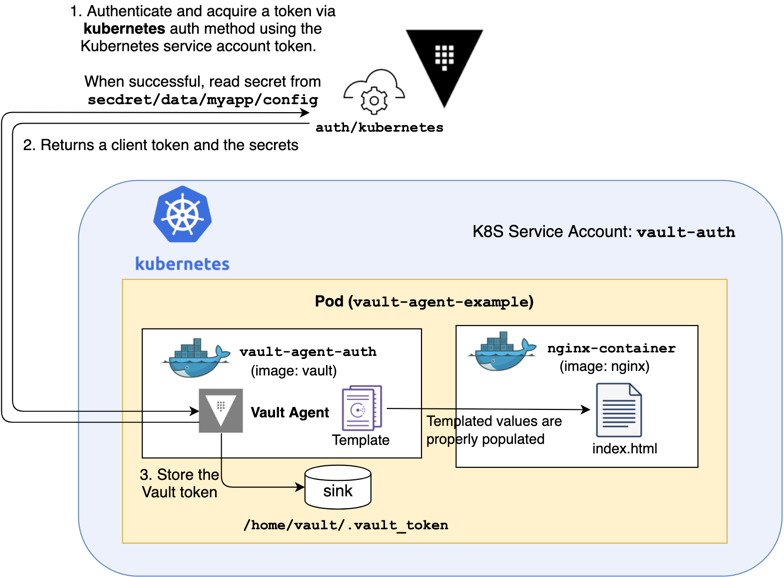
Initialize the Terraform configuration.
$ terraform -chdir=terraform/app initApply the Terraform configuration.
$ terraform -chdir=terraform/app apply -auto-approveDisplay the running pods.
$ kubectl get pods
NAME                  READY   STATUS    RESTARTS   AGE
vault-agent-example   1/1     Running   0          16m
This deploys a nginx web server alongside the Vault Agent as an init container. The Vault Agent authenticates to Vault using the Kubernetes auth method and retrieves a secret from the KV secrets engine. The Vault Agent writes the secret to a file that the nginx server serves and the Vault Agent init container exits.
Display the containers (and init containers) in the
vault-agent-examplepod.$ kubectl get pod vault-agent-example -o jsonpath='{.spec.containers[*].name}{"\n"}{.spec.initContainers[].name}' nginx-container vault-agent
In this example Vault Agent uses what feature to authenticate to Vault and retrieve secrets?
Auto-Authentication - The Vault Agent automatically authenticates to Vault using the Kubernetes auth method and retrieves a secret from the KV secrets engine.
Verification
In another terminal, port forward all requests made to
http://localhost:8080to port80on thevault-agent-examplepod.$ kubectl port-forward pod/vault-agent-example 8080:80In a web browser, go to
localhost:8080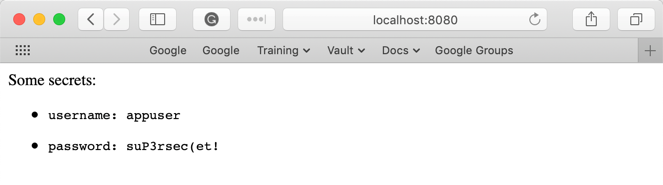
The page displays the values for
access_keyandsecret_access_keyfromsecret/data/myapp/api-key/.
Clean up
Stop the kubectl proxy.
Delete the application and Vault Agent.
$ terraform -chdir=terraform/app apply -destroy -auto-approveDelete the Kubernetes resources.
$ terraform -chdir=terraform/kubernetes/ apply -destroy -auto-approveStop the cluster.
$ minikube stop
✋  Stopping node "minikube"  ...
🛑  Powering off "minikube" via SSH ...
🛑  1 node stopped.
Delete the cluster.
$ minikube delete --all --purge
🔥  Deleting "minikube" in docker ...
🔥  Removing /Users/mrken/.minikube/machines/minikube ...
💀  Removed all traces of the "minikube" cluster.
🔥  Successfully deleted all profiles
💀  Successfully purged minikube directory located at - [/Users/you/.minikube]
📌  Kicbase images have not been deleted. To delete images run:
   ▪ docker rmi gcr.io/k8s-minikube/kicbase:<none> gcr.io/k8s-minikube/kicbase:v0.0.48 gcr.io/k8s-minikube/kicbase:<none> gcr.io/k8s-minikube/kicbase:v0.0.47 gcr.io/k8s-minikube/kicbase:<none>
Stop the Vault server process.
$ pkill vault
Knowledge checks
A quiz to test your knowledge.
What are the main features provided by Vault Agent?
🔘 Automated authentication with Vault
🔘 Secret caching and renewal
🔘 Template rendering for secrets
🔘 All of the above
❌ Automated authentication with Vault
❌ Secret caching and renewal
❌ Template rendering for secrets
✅ All of the above
Vault Agent provides automated authentication, caches secrets to reduce requests to Vault, handles secret renewal, and uses templates to render secrets into files or environment variables that applications can use.
How does Vault Agent authenticate to Vault using the Kubernetes auth method in this tutorial?
Vault Agent uses the Kubernetes service account token from the pod to authenticate with Vault. The
auto_authblock in the Vault Agent configuration specifies thekubernetesmethod with the role name, and Vault validates the service account against the configured role to issue a token with the appropriate policies.What does the
templateblock in the Vault Agent configuration accomplish?The
templateblock retrieves secrets from Vault and renders them into a file using a template. In this tutorial, it fetches theaccess_keyandsecret_access_keyfrom the KV secrets engine and writes them to an HTML file that the nginx web server serves, making the secrets available to the application without direct Vault API calls.
Summary
Vault Agent is a client-side daemon that provides easy access to secrets and handles authentication, caching, and renewal of secrets for your application.
In this tutorial, you learned how to use the Vault Agent to securely manage secrets for applications. You deployed a sample web application that uses the Vault Agent to retrieve secrets from Vault. You configured the Vault Agent to authenticate using the Kubernetes authentication method and retrieve an API credential from the Vault KV secrets engine. Vault agent wrote it to a file for the nginx server, and you verified that the application read the secret.
Next steps
Now that you understand how to use Vault Agent to retrieve secrets for Kubernetes applications, explore these topics to deepen your knowledge:
Compare secret delivery patterns
- Integrate Vault with Go Applications - Learn how to use the Vault Golang SDK for programmatic control over secret retrieval, dynamic secret fetching based on runtime conditions, and custom retry logic
- Manage Kubernetes native secrets with the Vault Secrets Operator - Synchronize secrets between Vault and Kubernetes using the Kubernetes-native Vault Secrets Operator (VSO) for applications that need to consume Kubernetes secrets
- Manage secrets by injecting a Vault Agent container - Deploy Vault-unaware applications that consume secrets from the filesystem using the Vault Agent Sidecar Injector
Explore advanced Vault Agent features
- Cache secrets with Vault Agent - Reduce workload on your Vault cluster with Agent caching to cache tokens and leased secrets, and learn about SSRF protection
- Manage secrets with Vault Agent with Amazon Elastic Container Service - Configure Vault Agent as a sidecar in Amazon ECS tasks with AWS IAM authentication
Work with dynamic secrets
- Understand static and dynamic secrets - Learn the difference between static and dynamic secrets in Vault and when to use each type
- Dynamic secrets for database credential management - Dynamically generate, manage, and revoke database credentials that meet your organization's password policy requirements
- Manage dynamic credential leases - Learn how to renew and revoke dynamic credentials to control secret lifecycles