Enable disaster recovery replication
Vault Enterprise supports multi-datacenter deployments with replication across datacenters for both performance and disaster recovery (DR).
Vault Enterprise replication follows a leader-follower model. The primary cluster is the system of record and streams data to all secondary clusters. Primary clusters can replicate to both DR secondary clusters and performance replication clusters.
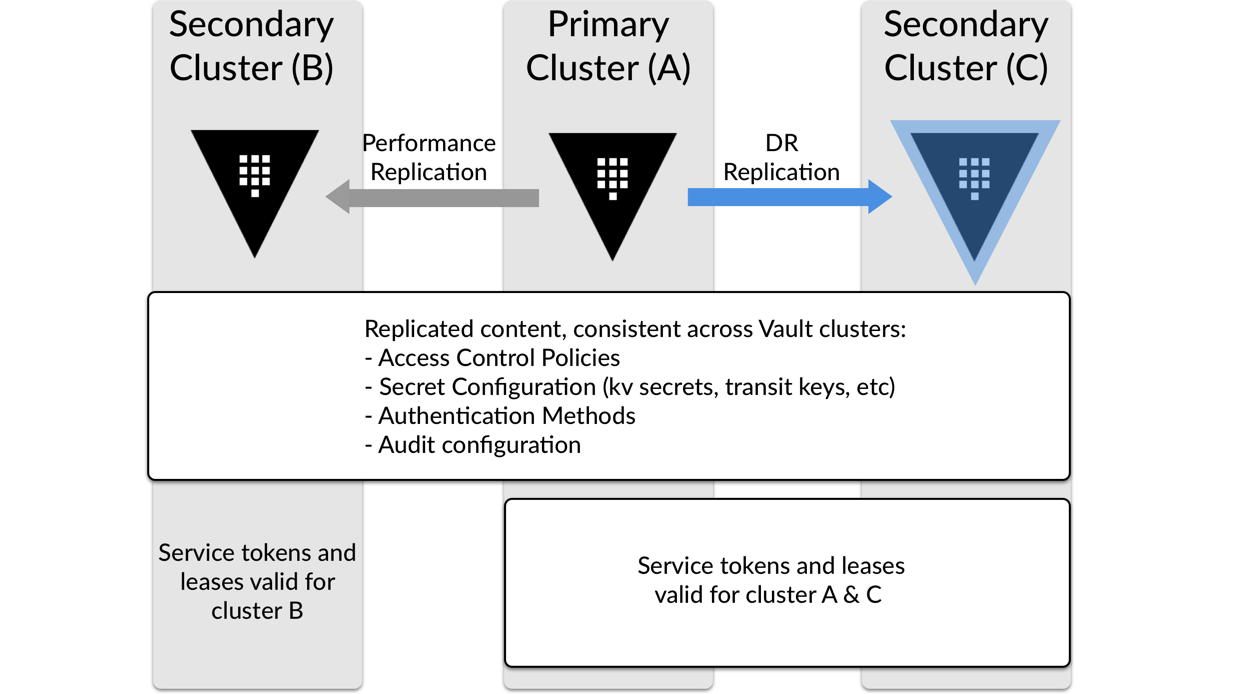
In DR replication, secondary clusters do not respond to read or write requests until you promote it to become the primary cluster. Each DR secondary cluster acts as a warm standby.
This tutorial series walks you through configuring DR replication, simulates a failure to the primary cluster, and fails back to the primary cluster.
The performance replication tutorial provides step-by-step instructions on setting up performance replication.
Prerequisites
This lab was tested on macOS using Apple silicon-based processors.
To perform the tasks described in this tutorial, you need to have:
- Vault Enterprise 2.x binary installed
- A Vault Enterprise license
- Docker to run Vault Enterprise
- jq installed
Scenario
HashiCups, a subsidiary of International Brewing Machines, has a new customer requirement to ensure all data exists in a secondary location. Oliver, from the operations team, maintains the HashiCups Vault Enterprise cluster. To support the new requirements, Oliver wants to enable DR replication to ensure HashiCups can access Vault data in the event of a major outage.
You will assume the role of Oliver and bring up two Vault instances to test the configuration.

Policy requirements
Setting up Vault Enterprise replication requires highly privileged
policies such as root and sudo capability.
If you are not familiar with policies, complete the policies tutorial.
# To enable DR primary
path "sys/replication/dr/primary/enable" {
  capabilities = ["create", "update"]
}

# To generate a secondary token required to add a DR secondary
path "sys/replication/dr/primary/secondary-token" {
  capabilities = ["create", "update", "sudo"]
}

# To create ACL policies
path "sys/policies/acl/*" {
  capabilities = ["create", "update", "list"]
}

# Create a token role for batch DR operation token
path "auth/token/roles/*" {
  capabilities = ["create", "update"]
}

# Create a token
path "auth/token/create" {
  capabilities = ["create", "update"]
}

# Create a token via a role (e.g. vault token create -role=failover-handler)
path "auth/token/create/*" {
  capabilities = ["create", "update"]
}

# To demote the primary to secondary
path "sys/replication/dr/primary/demote" {
  capabilities = ["create", "update"]
}

# To enable DR secondary
path "sys/replication/dr/secondary/enable" {
  capabilities = ["create", "update"]
}

# Vault 2.0.0+ requires a token to initiate DR operation token generation
path "sys/replication/dr/secondary/generate-operation-token/attempt" {
  capabilities = ["create", "read", "update", "delete"]
}

# Vault 2.0.0+ requires a token to supply key shares
path "sys/replication/dr/secondary/generate-operation-token/update" {
  capabilities = ["create", "update"]
}

# To promote the secondary cluster to be primary
path "sys/replication/dr/secondary/promote" {
  capabilities = ["create", "update"]
}

# To update the assigned primary cluster
path "sys/replication/dr/secondary/update-primary" {
  capabilities = ["create", "update"]
}

# If you choose to disable the original primary cluster post-recovery
path "sys/replication/dr/primary/disable" {
  capabilities = ["create", "update"]
}
Design considerations
There are several questions to consider when designing and planning for Vault disaster recovery.
Cluster setup
To support disaster recovery, you need two clusters: a primary and a secondary. In DR replication, the primary cluster services regular workload requests. The secondary cluster serves as a warm standby, and receives updates from the primary cluster, but does not service any requests until you promote it to become the primary cluster.
In a production environment, it is critical to plan the each cluster's version of Vault. Once you demote the original DR primary cluster, you cannot replicate data to it from a promoted cluster running a higher version of Vault.
For example, if Cluster A (a DR primary) is running 2.0.x and Cluster B (a DR secondary) is running Vault 2.1.x, you can promote Cluster B to become the primary cluster but you cannot replicate to Cluster A until you upgrade Cluster A to 2.1.x or above.
This limitation exists because Vault does not make backward-compatibility guarantees for its data store, but DR is often used to manage upgrading clusters.
The primary cluster replicates configuration of auth methods, secrets engines, tokens, and policies, so you do not need to configure these on the secondary cluster.
The primary cluster does not replicate the Vault configuration file to the secondary cluster. Match the secondary cluster's configuration file to the primary cluster's as closely as possible.
While there is no requirement to match infrastructure configuration such as the storage backend or seal type, consider matching them so operations and support teams know how to manage the secondary cluster during a disaster.
For example, if you typically manage auto-unseal on the primary cluster, managing a manual unseal process on the secondary cluster adds operational burden to a team already dealing with a disaster.
If you use raft storage on the primary, use raft storage on the secondary cluster. Like changing the seal type, having to manage different storage backends during a disaster is additional overhead on the team.
Region selection and network implications
You should select a region for your secondary cluster that is unlikely to be impacted by events that affect your primary cluster. For example, if your primary cluster is in a region that is prone to hurricanes, your secondary cluster should be in a region that is geographically isolated from those same events.
Vault replicates data from the primary cluster to the secondary cluster over port 8201. When configuring network access policies and firewall rules, be sure that the secondary site allows port 8201 between each site during regular operation.
Clients still access Vault over port 8200. While you can close this port to the secondary site during regular operations, make sure you have a workflow in place to open port 8200 during a disaster event.
To learn more about Vault disaster recovery design considerations, review the HashiCorp Validated Design for DR operations.
Set up the lab
Start two Vault Enterprise 2.1.1 containers and connect them so they can reach each other's API and cluster ports.
Export your Vault Enterprise license.
$ export VAULT_LICENSE=<your-license-string>Create one Docker network for each cluster.
$ docker network create vault-primary-net && \
   docker network create vault-dr-net
Create a working directory for the tutorial.
$ mkdir -p ~/tmp/dr-tutorial && cd ~/tmp/dr-tutorialStay in this directory to complete all tutorials in the series.
Create a configuration file for the Vault clusters.
$ tee vault-config.hcl <<'EOF'
storage "raft" {
  path = "/vault/file"
}

listener "tcp" {
  address     = "0.0.0.0:8200"
  tls_disable = 1
}

ui = true
EOF
Start cluster A (primary) on
vault-primary-net.$ docker run -d --name vault-primary --hostname vault-primary \ --network vault-primary-net \ -p 8200:8200 \ -p 8201:8201 \ -e VAULT_LICENSE \ -e VAULT_DISABLE_MLOCK=true \ -e VAULT_API_ADDR=http://vault-primary:8200 \ -e VAULT_CLUSTER_ADDR=https://vault-primary:8201 \ -v $(pwd)/vault-config.hcl:/vault/config/vault-config.hcl \ hashicorp/vault-enterprise:2.1.1-ent \ serverStart cluster B (DR secondary) on
vault-dr-netusing port 8210.$ docker run -d --name vault-dr --hostname vault-dr \ --network vault-dr-net \ -p 8210:8200 \ -e VAULT_LICENSE \ -e VAULT_DISABLE_MLOCK=true \ -e VAULT_API_ADDR=http://vault-dr:8200 \ -e VAULT_CLUSTER_ADDR=https://vault-dr:8201 \ -v $(pwd)/vault-config.hcl:/vault/config/vault-config.hcl \ hashicorp/vault-enterprise:2.1.1-ent \ serverAttach each container to the other cluster's network.
$ docker network connect vault-dr-net vault-primary && \
   docker network connect vault-primary-net vault-dr
Connecting the two networks mimics more complex network configurations that span geographical locations.
Set environment variables for the cluster addresses.
$ export PRIMARY_ADDR=http://127.0.0.1:8200 \
   DR_ADDR=http://127.0.0.1:8210
Initialize the primary cluster.
$ PRI_INIT=$(VAULT_ADDR=$PRIMARY_ADDR vault operator init -key-shares=1 -key-threshold=1 -format=json)Export the primary cluster's root token and unseal values as environment variables.
$ PRIMARY_UNSEAL_KEY=$(echo "$PRI_INIT" | jq -r '.unseal_keys_b64[0]') \
    PRIMARY_ROOT_TOKEN=$(echo "$PRI_INIT" | jq -r '.root_token')
Unseal the primary cluster.
$ VAULT_ADDR=$PRIMARY_ADDR vault operator unseal $PRIMARY_UNSEAL_KEYExample output:
Key                     Value
---                     -----
Seal Type               shamir
Initialized             true
Sealed                  false
Total Shares            1
Threshold               1
Version                 2.1.1+ent
Build Date              2026-09-15T21:39:40Z
Storage Type            raft
Cluster Name            vault-cluster-dcee2668
Cluster ID              b2ceb6f2-7892-ad54-c224-6222fb2649b3
Removed From Cluster    false
HA Enabled              true
HA Cluster              n/a
HA Mode                 standby
Active Node Address     <none>
Raft Committed Index    58
Raft Applied Index      58
Verify connectivity to the primary cluster.
$ VAULT_ADDR=$PRIMARY_ADDR VAULT_TOKEN=$PRIMARY_ROOT_TOKEN \
   vault auth list
Example output:
Path      Type     Accessor               Description                Version
----      ----     --------               -----------                -------
token/    token    auth_token_a05c13be    token based credentials    n/a
The
tokenauth method is the default for new clusters.Initialize the DR cluster.
$ DR_INIT=$(VAULT_ADDR=$DR_ADDR vault operator init -key-shares=1 -key-threshold=1 -format=json)Export the DR cluster's root token and unseal values as environment variables.
$ DR_UNSEAL_KEY=$(echo "$DR_INIT" | jq -r '.unseal_keys_b64[0]') \
    DR_ROOT_TOKEN=$(echo "$DR_INIT" | jq -r '.root_token')
Unseal the DR cluster.
$ VAULT_ADDR=$DR_ADDR vault operator unseal $DR_UNSEAL_KEYVault's unseal output is similar to the primary cluster's output. At this point, you have two separate Vault clusters. As the tutorial progresses, you will enable DR replication.
Verify connectivity to the DR cluster.
$ VAULT_ADDR=$DR_ADDR VAULT_TOKEN=$DR_ROOT_TOKEN \
   vault auth list
Like the primary cluster, Vault only lists the token auth method.
Create a policy on the primary cluster to allow Oliver to set up disaster recovery.
$ VAULT_ADDR=$PRIMARY_ADDR VAULT_TOKEN=$PRIMARY_ROOT_TOKEN \
  vault policy write dr-admin - <<'EOF'
  # To enable DR primary
  path "sys/replication/dr/primary/enable" {
    capabilities = ["create", "update"]
  }

  # To generate a secondary token required to add a DR secondary
  path "sys/replication/dr/primary/secondary-token" {
    capabilities = ["create", "update", "sudo"]
  }

  # To create ACL policies
  path "sys/policies/acl/*" {
    capabilities = ["create", "update", "list"]
  }

  # Create a token role for batch DR operation token
  path "auth/token/roles/*" {
    capabilities = ["create", "update"]
  }

  # Create a token
  path "auth/token/create" {
    capabilities = ["create", "update"]
  }

  # Create a token via a role (e.g. vault token create -role=failover-handler)
  path "auth/token/create/*" {
    capabilities = ["create", "update"]
  }

  # To demote the primary to secondary
  path "sys/replication/dr/primary/demote" {
    capabilities = ["create", "update"]
  }

  # To enable DR secondary
  path "sys/replication/dr/secondary/enable" {
    capabilities = ["create", "update"]
  }

  # Vault 2.0.0+ requires a token to initiate DR operation token generation
  path "sys/replication/dr/secondary/generate-operation-token/attempt" {
    capabilities = ["create", "read", "update", "delete"]
  }

  # Vault 2.0.0+ requires a token to supply key shares
  path "sys/replication/dr/secondary/generate-operation-token/update" {
    capabilities = ["create", "update"]
  }

  # To promote the secondary cluster to be primary
  path "sys/replication/dr/secondary/promote" {
    capabilities = ["create", "update"]
  }

  # To update the assigned primary cluster
  path "sys/replication/dr/secondary/update-primary" {
    capabilities = ["create", "update"]
  }

  # If you choose to disable the original primary cluster post-recovery
  path "sys/replication/dr/primary/disable" {
    capabilities = ["create", "update"]
  }
EOF
Example output:
Success! Uploaded policy: dr-adminEnable the userpass auth method on the primary cluster.
$ VAULT_ADDR=$PRIMARY_ADDR VAULT_TOKEN=$PRIMARY_ROOT_TOKEN \
   vault auth enable userpass
Example output:
Success! Enabled userpass auth method at: userpassCreate an admin user on Cluster A.
$ VAULT_ADDR=$PRIMARY_ADDR VAULT_TOKEN=$PRIMARY_ROOT_TOKEN \
   vault write auth/userpass/users/oliver password=primary-pw policies=dr-admin
Example output:
Success! Data written to: auth/userpass/users/oliverYou will use the
oliveraccount to how the authentication process works without a root token. In production, you should revoke the root token after configuring Vault for your administrators to manage the configuration.Oliver has set up two Vault clusters to replicate the configuration HashiCups wants to use in production. With the two clusters available, Oliver can now configure DR replication.
Enable DR primary replication
Configure DR replication on the primary cluster.
Enable DR replication on the primary cluster (Cluster A).
$ VAULT_ADDR=$PRIMARY_ADDR VAULT_TOKEN=$PRIMARY_ROOT_TOKEN \
    vault write -f sys/replication/dr/primary/enable
Example output:
WARNING! The following warnings were returned from Vault:

* This cluster is being enabled as a primary for replication. Vault will be
unavailable for a brief period and will resume service shortly.
Generate a secondary token.
$ SECONDARY_TOKEN=$(VAULT_ADDR=$PRIMARY_ADDR VAULT_TOKEN=$PRIMARY_ROOT_TOKEN \
    vault write sys/replication/dr/primary/secondary-token id="dr-secondary" -format=json) && \
    echo $SECONDARY_TOKEN | jq
Example output:
{
  "request_id": "",
  "lease_id": "",
  "lease_duration": 0,
  "renewable": false,
  "data": null,
  "warnings": null,
  "wrap_info": {
    "token": "eyJhbGciOipb...snip...T3JOQPjFQ2JkUZz",
    "accessor": "Vj5dLnu68LPyC7uGUHKq8Ayx",
    "ttl": 1800,
    "creation_time": "2026-10-09T16:42:46.606485219Z",
    "creation_path": "sys/replication/dr/primary/secondary-token",
    "wrapped_accessor": ""
  }
}
The generated
wrap_info.token, which you will need to enable the DR secondary cluster, is available in theSECONDARY_TOKENvariable.
Enable the DR secondary cluster
Configure DR replication on the secondary cluster.
Enable replication on the secondary cluster.
$ VAULT_ADDR=$DR_ADDR VAULT_TOKEN=$DR_ROOT_TOKEN \
    vault write sys/replication/dr/secondary/enable token=$(echo "$SECONDARY_TOKEN" | jq -r '.wrap_info.token')
Example output:
WARNING! The following warnings were returned from Vault:

* Vault has successfully found secondary information; it may take a while to
perform setup tasks. Vault will be unavailable until these tasks and initial
sync complete.
The
tokenvalue, stored in theSECONDARY_TOKENvariable, is the wrapping token obtained from the primary cluster.Confirm that the initial DR root token no longer works on Cluster B.
$ VAULT_ADDR=$DR_ADDR VAULT_TOKEN=$DR_ROOT_TOKEN \
   vault auth list
Example output:
Error listing enabled authentications: Error making API request.

URL: GET http://127.0.0.1:8210/v1/sys/auth
Code: 400. Errors:

* path disabled in replication DR secondary mode
The command, which returned the
tokenauth method during the set up the lab section, returns an error because replication replaced the data on the DR cluster with the primary cluster's data. The root token no longer works with that cluster, and the cluster does not respond to read requests because it is now a secondary cluster.Check the replication status on the DR cluster.
$ VAULT_ADDR=$DR_ADDR vault read -format=json sys/replication/dr/status | jq '.data'Example output:
{
  "cluster_id": "261b95f0-23fd-3198-8192-e47ce93a7715",
  "connection_state": "ready",
  "corrupted_merkle_tree": false,
  "known_primary_cluster_addrs": [
    "https://vault-primary:8201"
  ],
  "last_corruption_check_epoch": "-62135596800",
  "last_reindex_epoch": "1791565606",
  "last_remote_wal": 6384,
  "last_start": "2026-10-09T17:06:46Z",
  "merkle_root": "93354c80418a9de361e07c4f1b11bf55434b7159",
  "mode": "secondary",
  "primaries": [
    {
      "api_address": "http://vault-primary:8200",
      "clock_skew_ms": "-1",
      "cluster_address": "https://vault-primary:8201",
      "connection_status": "connected",
      "last_heartbeat": "2026-10-09T18:33:46Z",
      "last_heartbeat_duration_ms": "2",
      "replication_primary_canary_age_ms": "593"
    }
  ],
  "primary_cluster_addr": "https://vault-primary:8201",
  "secondary_id": "dr-secondary",
  "ssct_generation_counter": 0,
  "state": "stream-wals"
}
Line 3:
connection_state- Shows the state of the secondary’s gRPC connection to the primary’s cluster port. The statereadyconfirms replication is working.Lines 5-6:
known_primary_cluster_addrsdisplays all known primary clusters.vault-primaryis the name given to the container in the set up the lab section, and port8201is the port used for replication.Line 13:
modedisplays the clusters role in replication.secondarymeans the secondary cluster is receiving updates from the primary cluster.Line 28:
stateshows the current replication state.stream-walsmeans the cluster is up to date with the primary cluster.You have configured replication between two Vault clusters. The
sys/replication/dr/statusendpoint allows you to monitor the replication status in services such as DataDog or Splunk.
Clean up
Remove the containers, networks, files, and environment variables from this tutorial.
Stop and remove the containers, including their anonymous data volumes.
$ docker rm -f -v vault-primary vault-drThe
-fflag removes running containers. The-vflag removes the anonymous volumes that Docker creates for the/vault/fileand/vault/logspaths.Remove the Docker networks.
$ docker network rm vault-primary-net vault-dr-netRemove the configuration file and the working directory.
$ rm vault-config.hcl && cd ~/tmp && rf -rf dr-tutorialUnset the environment variables.
$ unset VAULT_LICENSE PRIMARY_ADDR DR_ADDR PRI_INIT PRIMARY_UNSEAL_KEY \
    PRIMARY_ROOT_TOKEN DR_INIT DR_UNSEAL_KEY DR_ROOT_TOKEN SECONDARY_TOKEN
(Optional) Remove the Docker image.
$ docker image rm hashicorp/vault-enterprise:2.1.1-ent
Summary
You have completed the DR replication configuration. The primary Vault cluster continues to serve read and write requests, while replicating data to the DR secondary cluster.

Help and reference
Learn more about disaster recovery concepts in the HashiCorp Well-Architected Framework.
For more information on Vault disaster recovery, refer to the Vault documentation.